Documentation Index Fetch the complete documentation index at: https://plivo.com/docs/llms.txt
Use this file to discover all available pages before exploring further.
Get started with Plivo Voice in minutes. This guide walks you through making your first outbound call and receiving incoming calls.
Prerequisites
Before you begin:
Sign up for a Plivo account (free trial includes credits)
Note your Auth ID and Auth Token from the console dashboard
Rent a phone number for receiving calls
Install the SDK
Python
Node.js
Ruby
PHP
Java
.NET
Go
For web framework support, also install Flask: For web server support, also install Express: gem install plivo sinatra
composer require plivo/plivo-php
Add to your pom.xml: < dependency >
< groupId > com.plivo </ groupId >
< artifactId > plivo-java </ artifactId >
< version > 5.9.0 </ version >
</ dependency >
go get github.com/plivo/plivo-go/v7
Make an Outbound Call
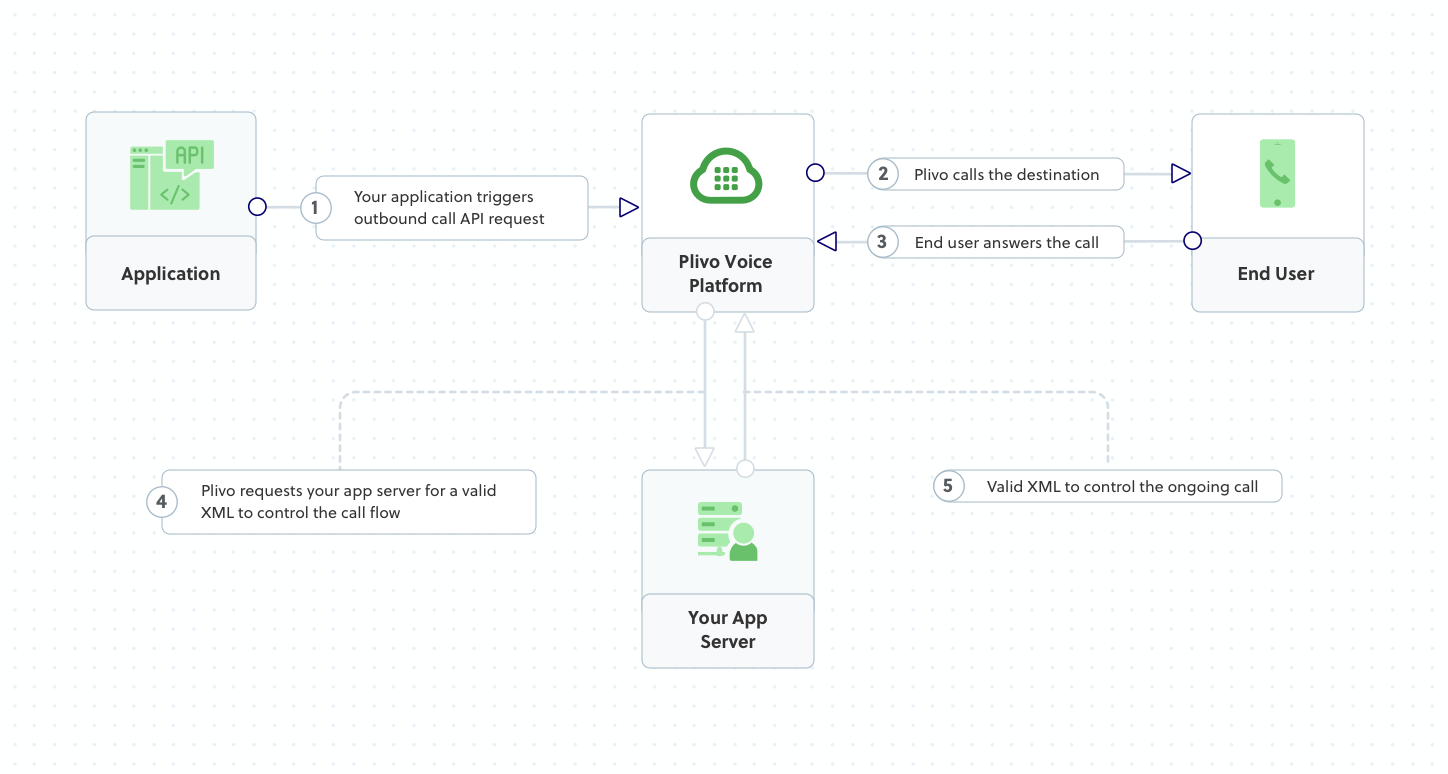
Create a call from your Plivo number to any phone number. When the call is answered, Plivo fetches XML instructions from your answer_url.
Python
Node.js
Ruby
PHP
Java
.NET
Go
cURL
import plivo
client = plivo.RestClient( '<auth_id>' , '<auth_token>' )
response = client.calls.create(
from_ = '+14151234567' , # Your Plivo number
to_ = '+14157654321' , # Destination number
answer_url = 'https://s3.amazonaws.com/static.plivo.com/answer.xml' ,
answer_method = 'GET'
)
print (response)
const plivo = require ( 'plivo' );
const client = new plivo . Client ( '<auth_id>' , '<auth_token>' );
client . calls . create (
'+14151234567' , // from
'+14157654321' , // to
'https://s3.amazonaws.com/static.plivo.com/answer.xml' , // answer_url
{ answerMethod: 'GET' }
). then ( console . log );
require 'plivo'
api = Plivo :: RestClient . new ( '<auth_id>' , '<auth_token>' )
response = api. calls . create (
'+14151234567' , # from
[ '+14157654321' ], # to
'https://s3.amazonaws.com/static.plivo.com/answer.xml' , # answer_url
'GET' # answer_method
)
puts response
<? php
require 'vendor/autoload.php' ;
use Plivo\ RestClient ;
$client = new RestClient ( '<auth_id>' , '<auth_token>' );
$response = $client -> calls -> create (
'+14151234567' , // from
[ '+14157654321' ], // to
'https://s3.amazonaws.com/static.plivo.com/answer.xml' , // answer_url
[ 'answerMethod' => 'GET' ]
);
print_r ( $response );
import com.plivo.api.Plivo;
import com.plivo.api.models.call.Call;
public class MakeCall {
public static void main ( String [] args ) {
Plivo . init ( "<auth_id>" , "<auth_token>" );
Call . creator ( "+14151234567" , "+14157654321" ,
"https://s3.amazonaws.com/static.plivo.com/answer.xml" )
. answerMethod ( "GET" )
. create ();
}
}
using Plivo ;
var api = new PlivoApi ( "<auth_id>" , "<auth_token>" );
var response = api . Call . Create (
from : "+14151234567" ,
to : new [] { "+14157654321" },
answerUrl : "https://s3.amazonaws.com/static.plivo.com/answer.xml" ,
answerMethod : "GET"
);
Console . WriteLine ( response );
package main
import " github.com/plivo/plivo-go/v7 "
func main () {
client , _ := plivo . NewClient ( "<auth_id>" , "<auth_token>" , & plivo . ClientOptions {})
client . Calls . Create ( plivo . CallCreateParams {
From : "+14151234567" ,
To : "+14157654321" ,
AnswerURL : "https://s3.amazonaws.com/static.plivo.com/answer.xml" ,
AnswerMethod : "GET" ,
})
}
curl -i --user AUTH_ID:AUTH_TOKEN \
-H "Content-Type: application/json" \
-d '{
"from": "+14151234567",
"to": "+14157654321",
"answer_url": "https://s3.amazonaws.com/static.plivo.com/answer.xml",
"answer_method": "GET"
}' \
https://api.plivo.com/v1/Account/{auth_id}/Call/
The sample answer.xml file plays a message:
< Response >
< Speak > Congratulations! You've made your first outbound call! </ Speak >
</ Response >
Replace this URL with your own server endpoint to control call behavior dynamically.
Receive an Incoming Call
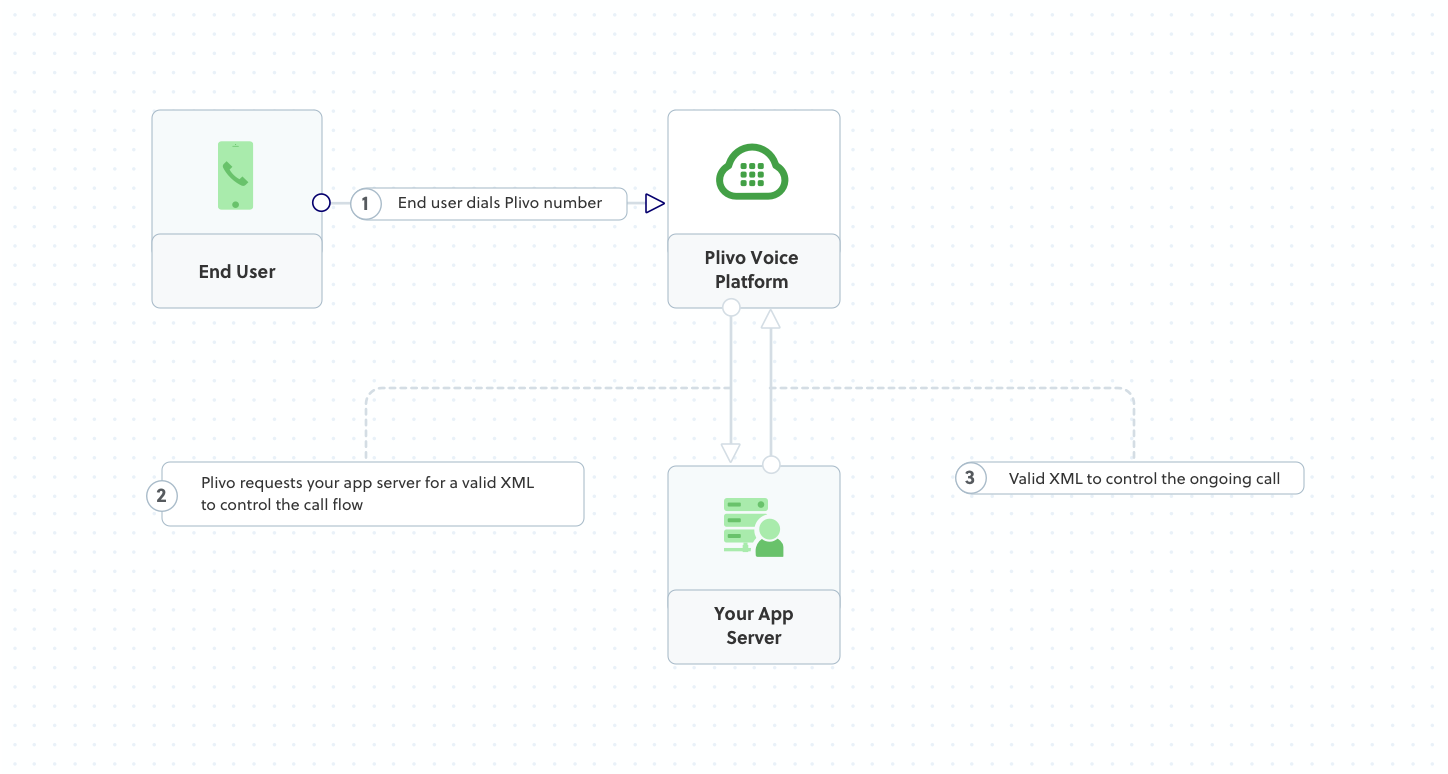
Set up a web server to handle incoming calls. When someone calls your Plivo number, Plivo sends a request to your Answer URL and executes the XML instructions you return.
Python
Node.js
Ruby
PHP
Java
.NET
Go
from flask import Flask, Response
from plivo import plivoxml
app = Flask( __name__ )
@app.route ( '/answer/' , methods = [ 'GET' , 'POST' ])
def answer_call ():
response = plivoxml.ResponseElement()
response.add(plivoxml.SpeakElement( 'Hello! Thanks for calling.' ))
return Response(response.to_string(), mimetype = 'application/xml' )
if __name__ == '__main__' :
app.run( host = '0.0.0.0' , port = 5000 )
Run: python app.py const express = require ( 'express' );
const plivo = require ( 'plivo' );
const app = express ();
app . all ( '/answer/' , ( req , res ) => {
const response = plivo . Response ();
response . addSpeak ( 'Hello! Thanks for calling.' );
res . set ( 'Content-Type' , 'application/xml' );
res . send ( response . toXML ());
});
app . listen ( 5000 , () => console . log ( 'Server running on port 5000' ));
Run: node app.js require 'sinatra'
require 'plivo'
get '/answer/' do
response = Plivo :: XML :: Response . new
response. addSpeak ( 'Hello! Thanks for calling.' )
content_type 'application/xml'
response. to_xml
end
Run: ruby app.rb <? php
require 'vendor/autoload.php' ;
use Plivo\XML\ Response ;
$response = new Response ();
$response -> addSpeak ( 'Hello! Thanks for calling.' );
header ( 'Content-Type: application/xml' );
echo $response -> toXML ();
import com.plivo.api.xml.Response;
import com.plivo.api.xml.Speak;
import static spark.Spark. * ;
public class ReceiveCall {
public static void main ( String [] args ) {
get ( "/answer/" , (req, res) -> {
res . type ( "application/xml" );
return new Response ()
. children ( new Speak ( "Hello! Thanks for calling." ))
. toXmlString ();
});
}
}
using Microsoft . AspNetCore . Mvc ;
using Plivo . XML ;
[ ApiController ]
[ Route ( "[controller]" )]
public class AnswerController : ControllerBase
{
[ HttpGet ]
[ HttpPost ]
public ContentResult Answer ()
{
var response = new Response ();
response . AddSpeak ( "Hello! Thanks for calling." );
return Content ( response . ToString (), "application/xml" );
}
}
package main
import (
" github.com/plivo/plivo-go/v7/xml "
" net/http "
)
func main () {
http . HandleFunc ( "/answer/" , func ( w http . ResponseWriter , r * http . Request ) {
response := xml . ResponseElement {
Contents : [] interface {}{
new ( xml . SpeakElement ). SetContents ( "Hello! Thanks for calling." ),
},
}
w . Header (). Set ( "Content-Type" , "application/xml" )
w . Write ([] byte ( response . String ()))
})
http . ListenAndServe ( ":5000" , nil )
}
Run: go run main.go
Expose Your Server
Use ngrok to expose your local server to the internet:
Copy the HTTPS forwarding URL (e.g., https://abc123.ngrok.io).
Go to Voice Applications in the Plivo console
Click Add New Application
Set the Answer URL to your ngrok URL + /answer/ (e.g., https://abc123.ngrok.io/answer/)
Save the application
Go to Active Numbers
Select your number and assign your application
Now call your Plivo number to hear the greeting!
Forward a Call
Dial another number when receiving an incoming call.
Python
Node.js
Ruby
PHP
cURL
from flask import Flask, Response
from plivo import plivoxml
app = Flask( __name__ )
@app.route ( '/forward/' , methods = [ 'GET' , 'POST' ])
def forward_call ():
response = plivoxml.ResponseElement()
dial = plivoxml.DialElement()
dial.add(plivoxml.NumberElement( '+14157654321' ))
response.add(dial)
return Response(response.to_string(), mimetype = 'application/xml' )
if __name__ == '__main__' :
app.run( host = '0.0.0.0' , port = 5000 )
const express = require ( 'express' );
const plivo = require ( 'plivo' );
const app = express ();
app . all ( '/forward/' , ( req , res ) => {
const response = plivo . Response ();
const dial = response . addDial ();
dial . addNumber ( '+14157654321' );
res . set ( 'Content-Type' , 'application/xml' );
res . send ( response . toXML ());
});
app . listen ( 5000 );
require 'sinatra'
require 'plivo'
get '/forward/' do
response = Plivo :: XML :: Response . new
dial = response. addDial ()
dial. addNumber ( '+14157654321' )
content_type 'application/xml'
response. to_xml
end
<? php
require 'vendor/autoload.php' ;
use Plivo\XML\ Response ;
$response = new Response ();
$dial = $response -> addDial ();
$dial -> addNumber ( '+14157654321' );
header ( 'Content-Type: application/xml' );
echo $response -> toXML ();
Example XML to return: < Response >
< Dial >
< Number > +14157654321 </ Number >
</ Dial >
</ Response >
Next Steps
Call API Reference Complete API documentation for managing calls
XML Reference All XML elements for call control
Use Cases Common voice application patterns
Webhooks Handle call events in real-time
Framework-Specific Guides
For detailed setup with specific frameworks:
Environment Variables
Store credentials securely using environment variables:
export PLIVO_AUTH_ID = your_auth_id
export PLIVO_AUTH_TOKEN = your_auth_token
All Plivo SDKs automatically read these variables when you initialize the client without arguments:
# Python
client = plivo.RestClient() # Reads from environment
// Node.js
const client = new plivo . Client (); // Reads from environment