

- What: 140-series numbers are TRAI-regulated for promotional voice calls in India only.
- You must: Register on Tata DLT and complete Plivo’s header and template provisioning.
- If you don’t: You can’t place promotional calls. Explicit consent is also required first.
Overview
140-series numbers are ten-digit telephone numbers designated by the Indian Department of Telecommunications for promotional voice communications. These numbers are subject to strict regulatory oversight by TRAI and are exclusively for promotional calls made with explicit digital consent.Permitted Use Cases
140-series numbers are for promotional voice communication only. Do not use them for transactional or service calls. Acceptable use cases:- Product offers and marketing campaigns
- Cross-sell and upsell calls to existing customers with consent
- Survey and feedback calls tied to a promotional intent
Roles in 140-Series Provisioning
Self-Managed vs Partner-Managed
There are two possibilities depending on who places the calls:
Both setups use the same steps below; the difference shows up during registration.
TM registration location. Plivo currently accepts 140-series provisioning only when the TM entity is registered in Mumbai or Karnataka. Entities registered elsewhere are not supported today.
DLT operator support. Plivo currently provisions 140 and 160-series numbers exclusively through Tata Teleservices and is in the process of onboarding additional service providers. Entities registered on other DLT platforms (Airtel, Vi, BSNL) are not supported today.
Prerequisites
The Aggregator Telemarketer Declaration is collected by Plivo during Step 2 below — no separate Plivo KYC is required.
Provisioning Process
Step 1: Tata DLT Registration
Who: PE and TM (you) Register on the Tata Teleservices DLT portal:
Tata emails the approved TM and PE certificates to the registered email IDs.
Step 2: Submit the Aggregator Telemarketer Declaration to Plivo
Who: TM (you, or your partner)- Download the Aggregator Telemarketer Declaration.
- Fill in all fields — full name, PAN, CIN, address of the TM, Tata DLT Telemarketer ID, and DLT operator (Tata Teleservices). In the Self-Managed setup, use the single legal entity’s details.
- Have the TM’s authorized representative sign the document and apply the company seal.
- Submit it to Plivo by emailing it to your Account Manager or raising a Plivo Support ticket with the form attached.
Step 3: Plivo Allocates the Number and Issues the NOC
Who: Plivo After Plivo validates the declaration:- Plivo allocates a 140-series number (Header CLI) to your account.
- Plivo issues a No Objection Certificate (NOC) to the TM by replying to the same email or support ticket where the declaration was shared. Plivo issues a separate NOC for each number procured.
Step 4: Voice Header Registration
Who: TM (always — in Self-Managed, log in with your TM persona on Tata DLT) The TM logs into the Tata DLT portal and submits the Voice Header registration with these fields: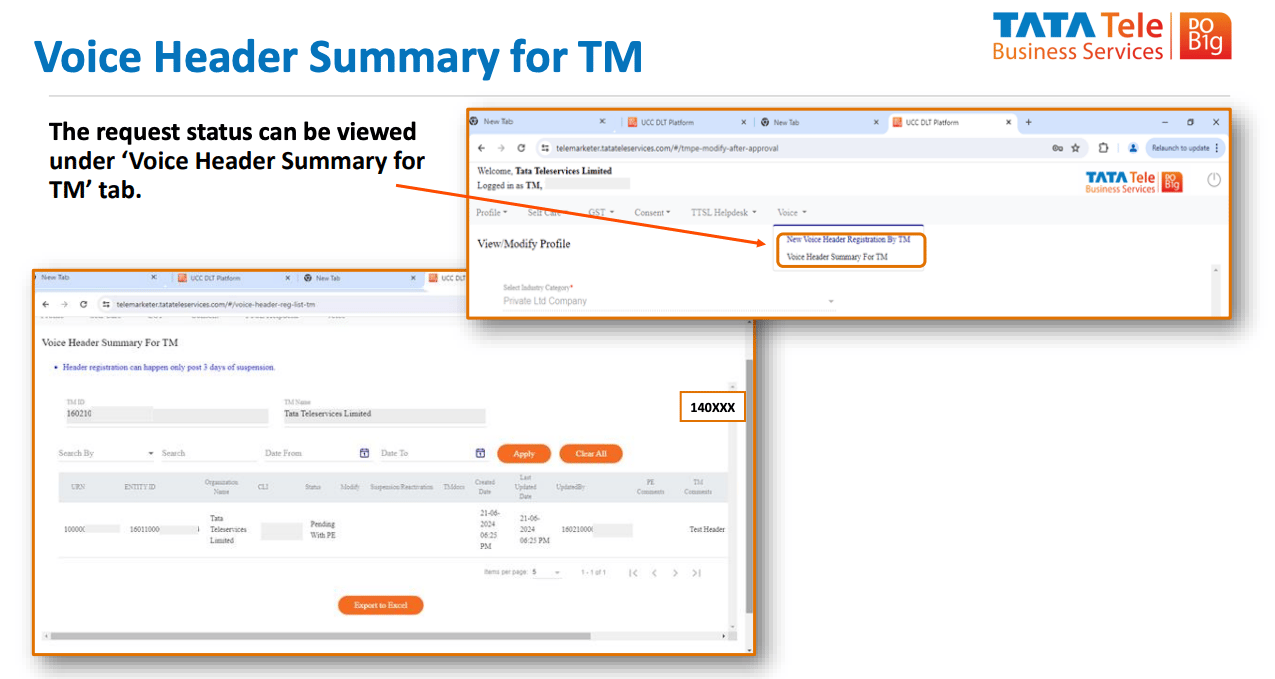
Step 5: Voice Header Approval
Who: PE (always — in Self-Managed, log in with your PE persona on Tata DLT) The PE logs into the Tata DLT portal and goes to Voice > Voice Header Registration List For PE.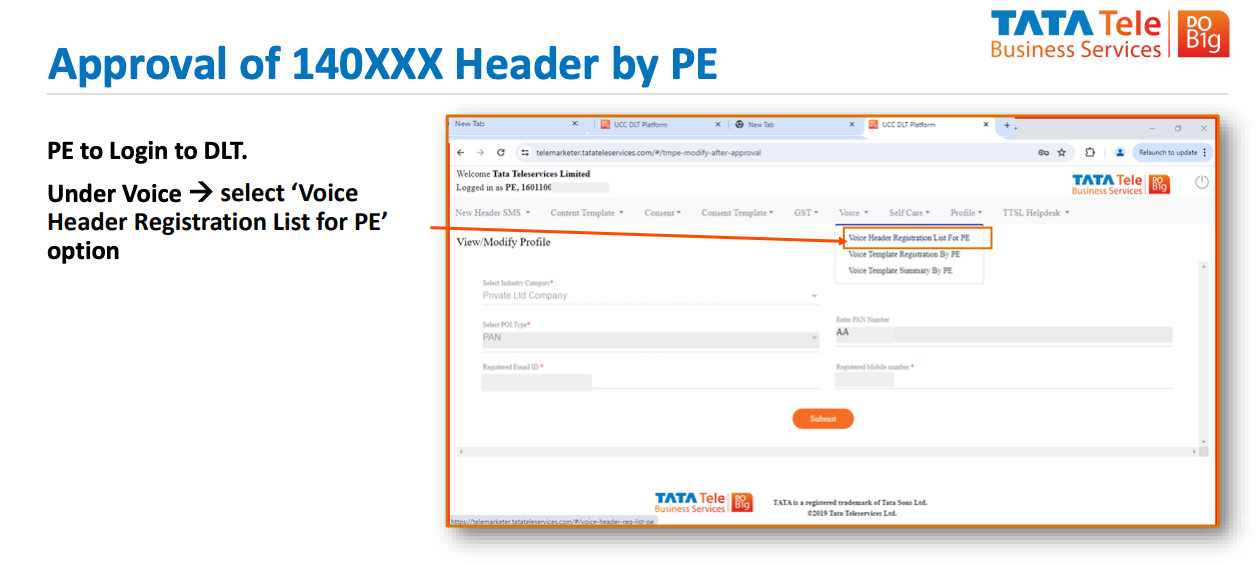
Step 6: Voice Template Registration
Who: PE The PE logs into the Tata DLT portal and goes to Voice > Voice Template Registration by PE.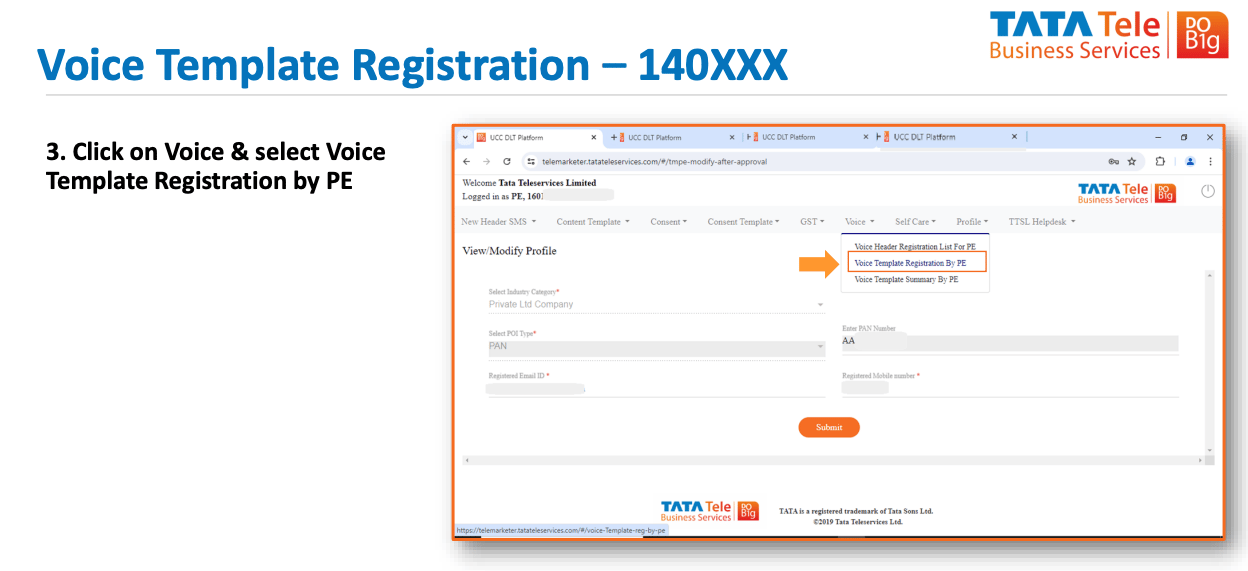
Submit the template. Tata approves it within 1 business day. Once approved, the 140-series number is ready for live promotional calls.
Estimated Timelines
Best Practices
- Capture explicit digital consent — Promotional calls without valid consent are treated as Unsolicited Commercial Communication (UCC). Store consent records with timestamps for audit.
- Maintain compliance documentation — Keep all documents (TM Certificate, PE Certificate, Aggregator Telemarketer Declaration, NOCs, GST PDF) in a secure, accessible location for audits.
- Monitor DLT portal status — Regularly check the Tata DLT portal for updates, renewal requirements, or compliance notifications.
- Test before go-live — Validate Voice Templates and call flows in a test environment before deploying to production.
- Stay updated on regulations — Monitor TRAI and DoT announcements for changes to 140-series number regulations.
FAQs
Can I use 140-series numbers for transactional or service calls?
No. 140-series numbers are strictly for promotional communications only. Transactional and service calls require a different number series — see India Calling Regulations for the full breakdown.Do I need to submit a new NOC for every 140-series number?
Yes. Plivo issues a separate NOC for each number procured. Upload the relevant NOC during Voice Header registration on the Tata DLT portal.What if my entity is registered on a DLT platform other than Tata?
Plivo has partnered exclusively with Tata for 140-series provisioning. Entities registered on other DLT platforms (such as Airtel, Vi, or BSNL) are not supported. Register as a Telemarketer and Principal Entity on the Tata DLT portal.What happens if my Voice Header registration is rejected?
You receive notification via the DLT portal with the reason for rejection. Common reasons include:- Incomplete or incorrect documentation
- Mismatch between PE or TM details and submitted documents
- Invalid NOC or GST certificate
Do I need to renew my 140-series numbers?
Yes. Maintain active TM and PE registration on the Tata DLT portal and ensure all compliance documents remain current. Check with Tata regarding renewal timelines for TM, PE, and Voice Template registrations.Related
- India Calling Regulations — Regulatory requirements and calling rules
- India Number KYC — KYC documents and number rental process
- 160-Series Numbers — Setup guide for BFSI transactional and service voice numbers
- UCC Management — How Plivo handles UCC complaints
- Plivo Console — Manage your account and numbers
- Plivo Support — Get help with provisioning questions