

Documentation Index
Fetch the complete documentation index at: https://plivo.com/docs/llms.txt
Use this file to discover all available pages before exploring further.
- What: REST API + XML to make, receive, and control phone calls programmatically. Supports PSTN, SIP, and WebRTC endpoints
- How: Outbound calls via Call API; inbound calls trigger your Answer URL which returns XML instructions
- Key concept: Every call has at least one “leg”. Forwarded calls create a second leg, each billed separately
- Limitation: Outbound API calls are queued at 2 calls per second (default). See Account Limits to increase
- Make phone calls to any phone number in the world.
- Receive phone calls on virtual phone numbers purchased through Plivo.
- Make internet calls to and from IP endpoints connected through Plivo’s Browser, iOS, and Android SDKs, or through third-party softphone clients.
- Control the experience on connected calls in real time using Plivo XML elements and APIs to perform actions such as playing a prompt or dialing and connecting a call to another number.
What is a voice call?
A voice call involves two-way conversation between two or more users. Plivo acts as the intermediary to connect these users. Devices that may be involved in a voice call include not only mobile, landline, and VoIP phones, but also browser and mobile apps.Call legs
For voice calls on the Plivo voice platform, multiple call legs may be involved, depending on the call flow, and each call leg is considered a separate call. For example, in a call forwarding use case, the inbound connection between the caller and the Plivo voice platform is considered the A leg, and the outbound connection between the Plivo voice platform and the destination is the B leg.Types of calls
Plivo supports outbound, inbound, and forwarded calls. Here’s a look at how each works.Outbound API calls
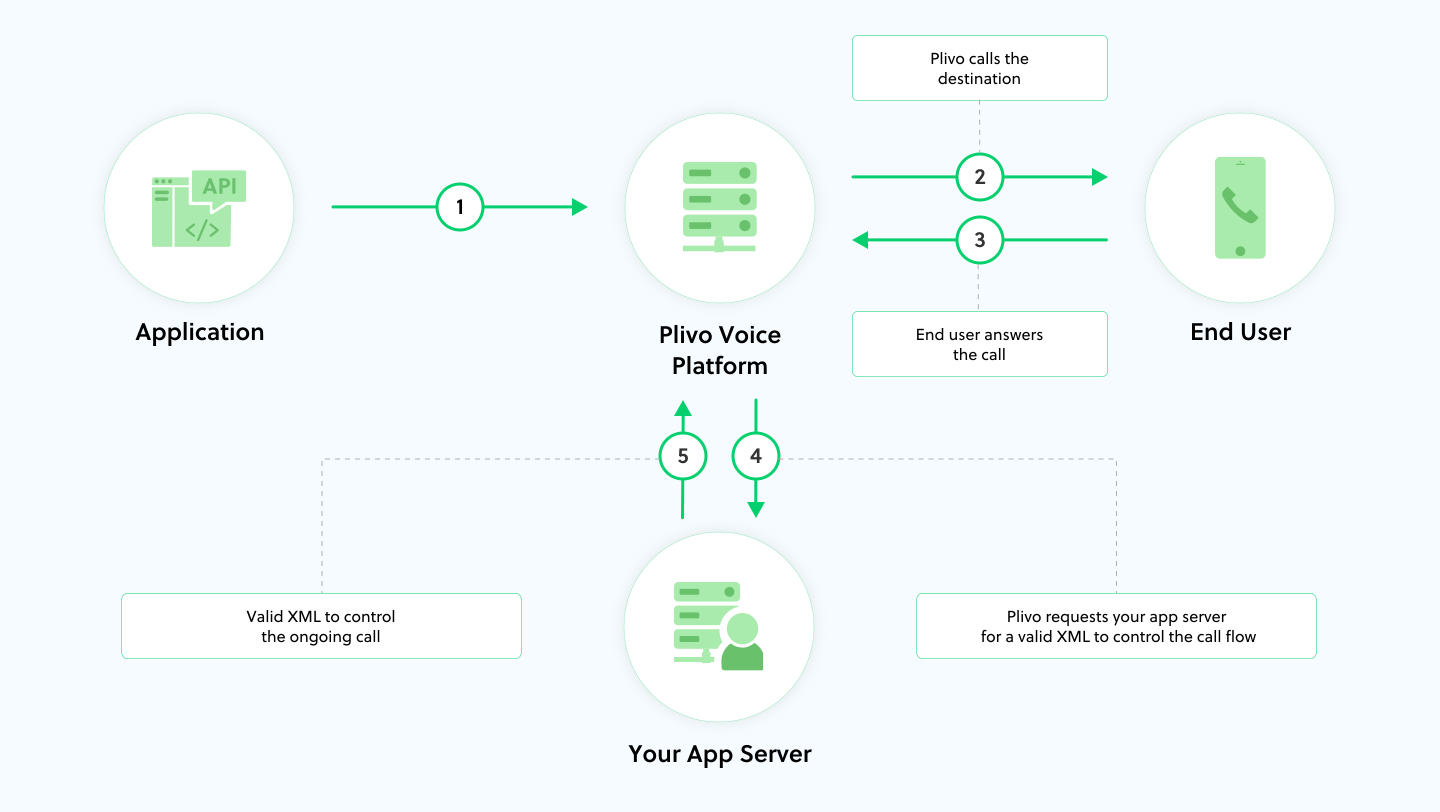
- Your application uses Plivo’s voice API to make an outbound call. Outbound API call requests are queued and processed at two calls per second.
- Plivo makes a call to a destination number.
- Plivo notifies your application server as soon as the call is answered.
- Plivo handles the call based on the XML returned by the application server.
Inbound calls to Plivo phone numbers
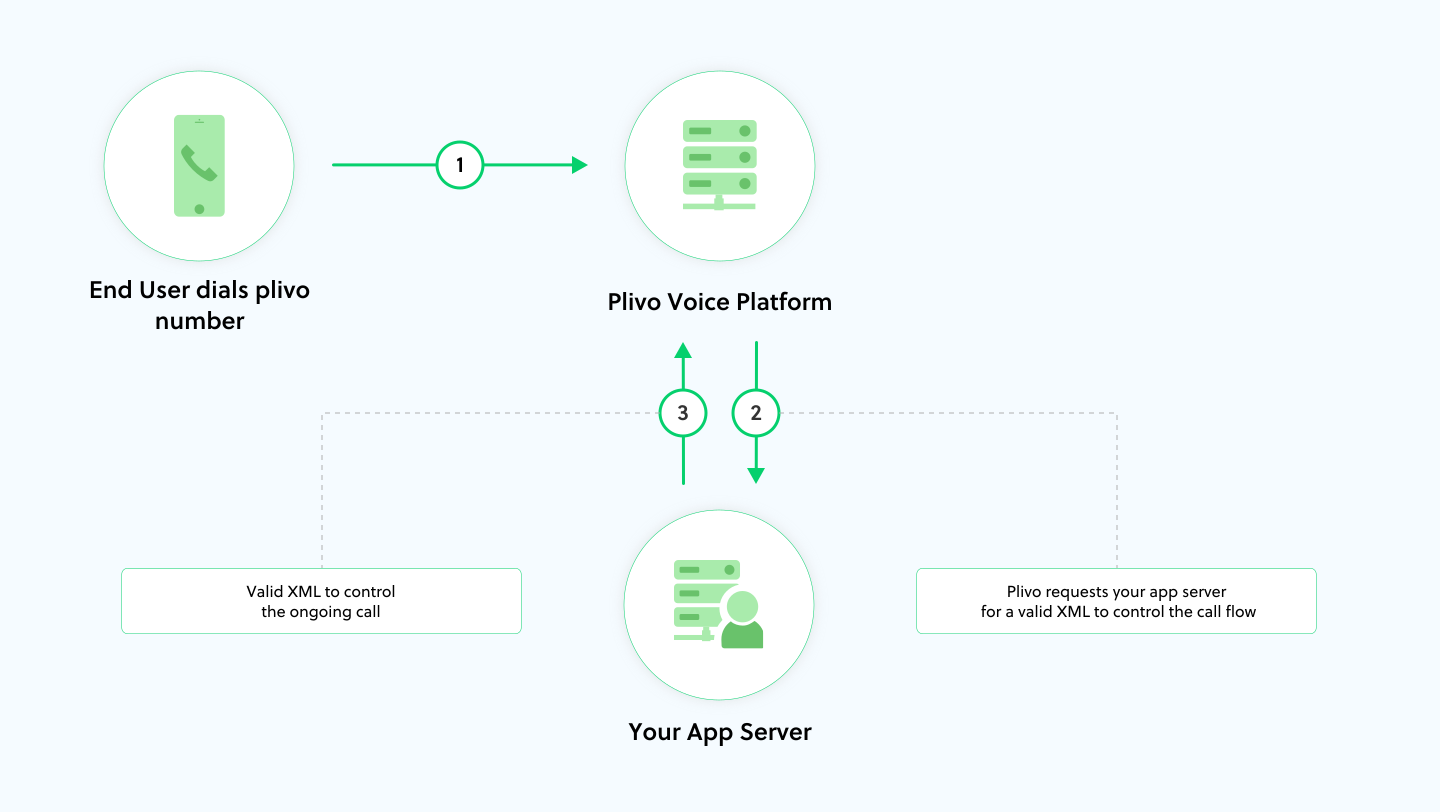
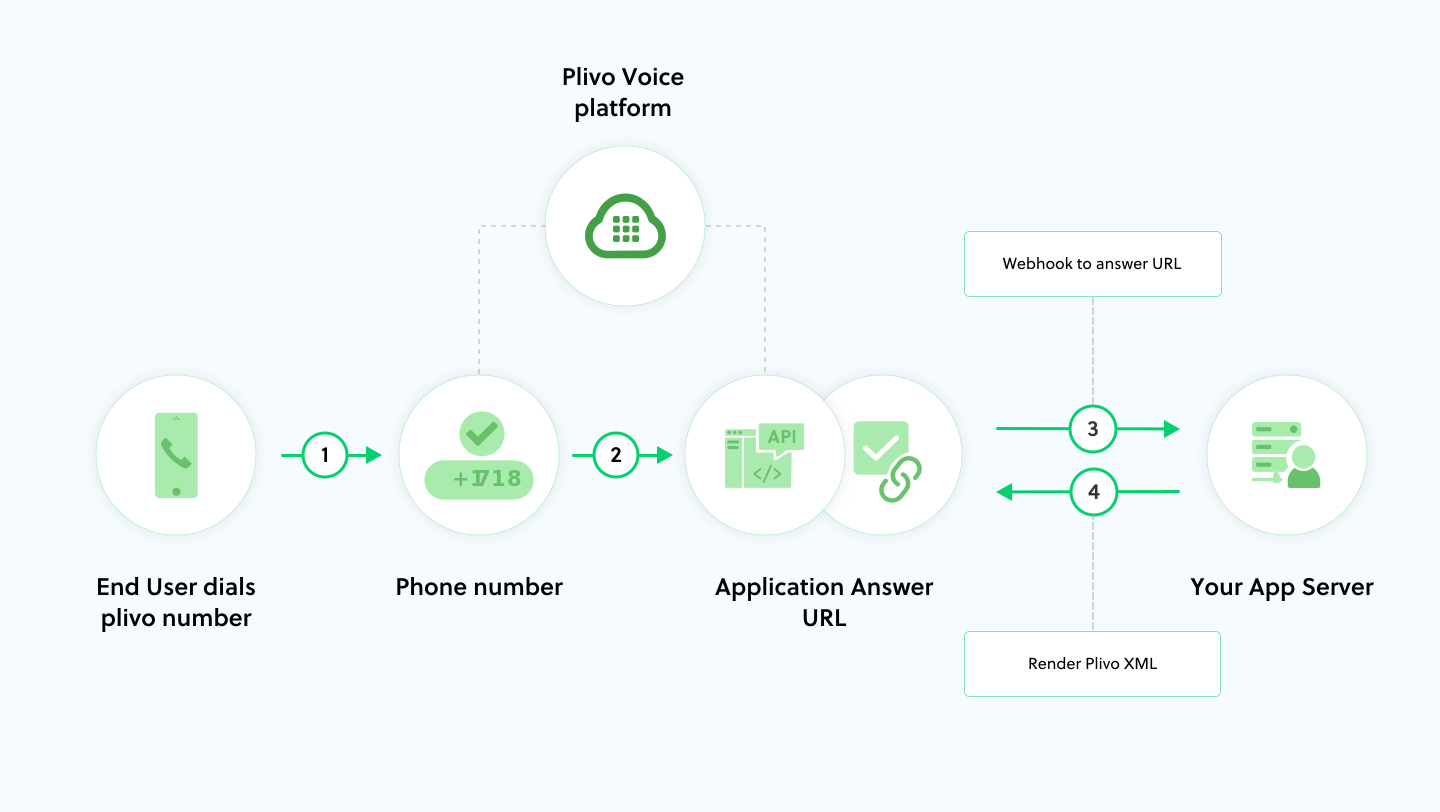
- Someone calls your Plivo phone number.
- Plivo notifies your application server about the call.
- Plivo handles the call based on the XML returned by the application server.
Forwarded calls
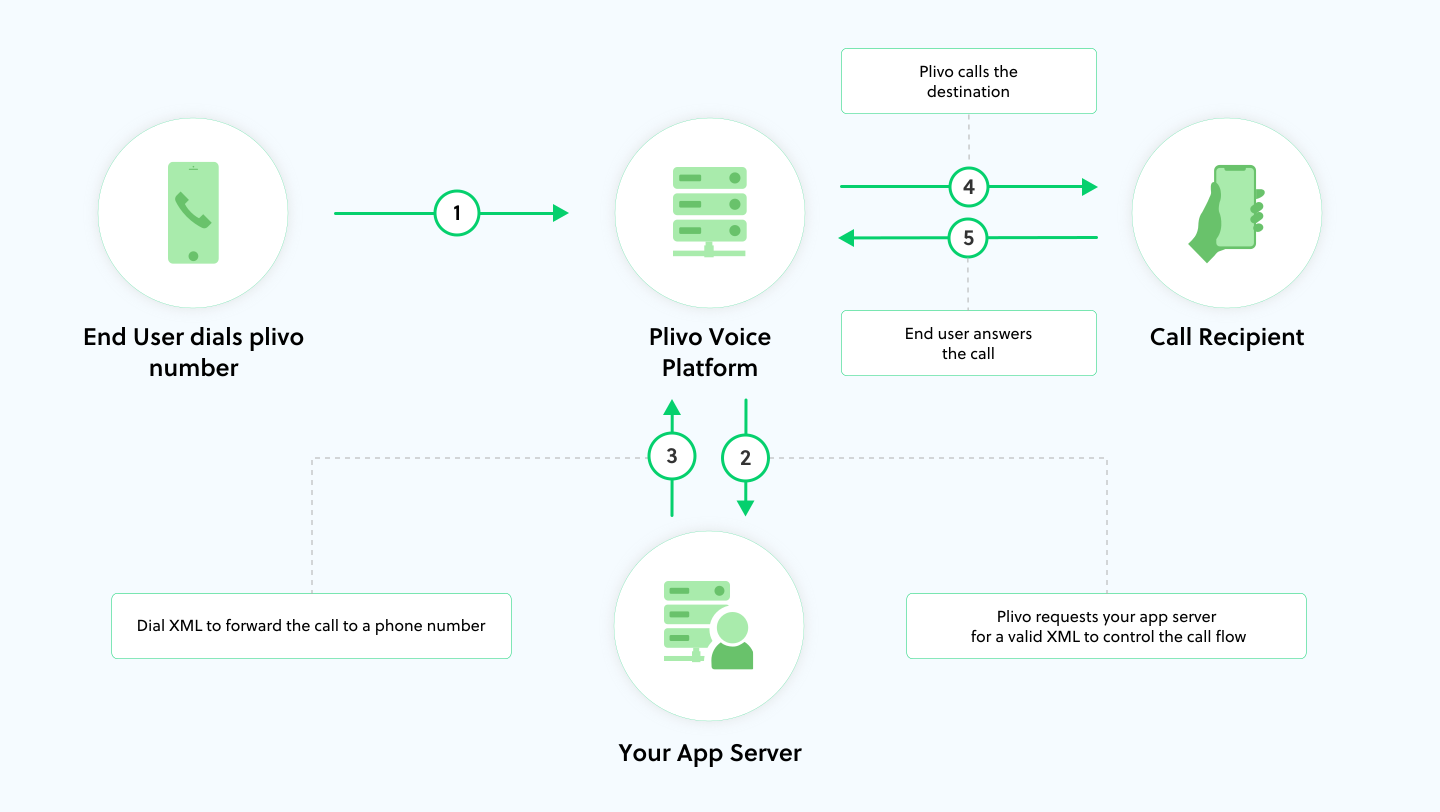
- Someone calls your Plivo phone number.
- Plivo notifies your application server about the call.
- Plivo handles the call based on the XML returned by the application server. In this case, the application server returns a Dial XML element with instructions to forward the call to another number.
- Plivo initiates a call to the phone number or SIP endpoint specified in the Dial XML.
- Once the call is answered, the two parties are connected.
Note: There are two distinct call legs involved in this call flow.
*A leg: The inbound call connection from the caller to Plivo.
*B leg: The outbound call from Plivo to the destination specified in the Dial XML.
Inbound IP calls from browsers and mobile apps
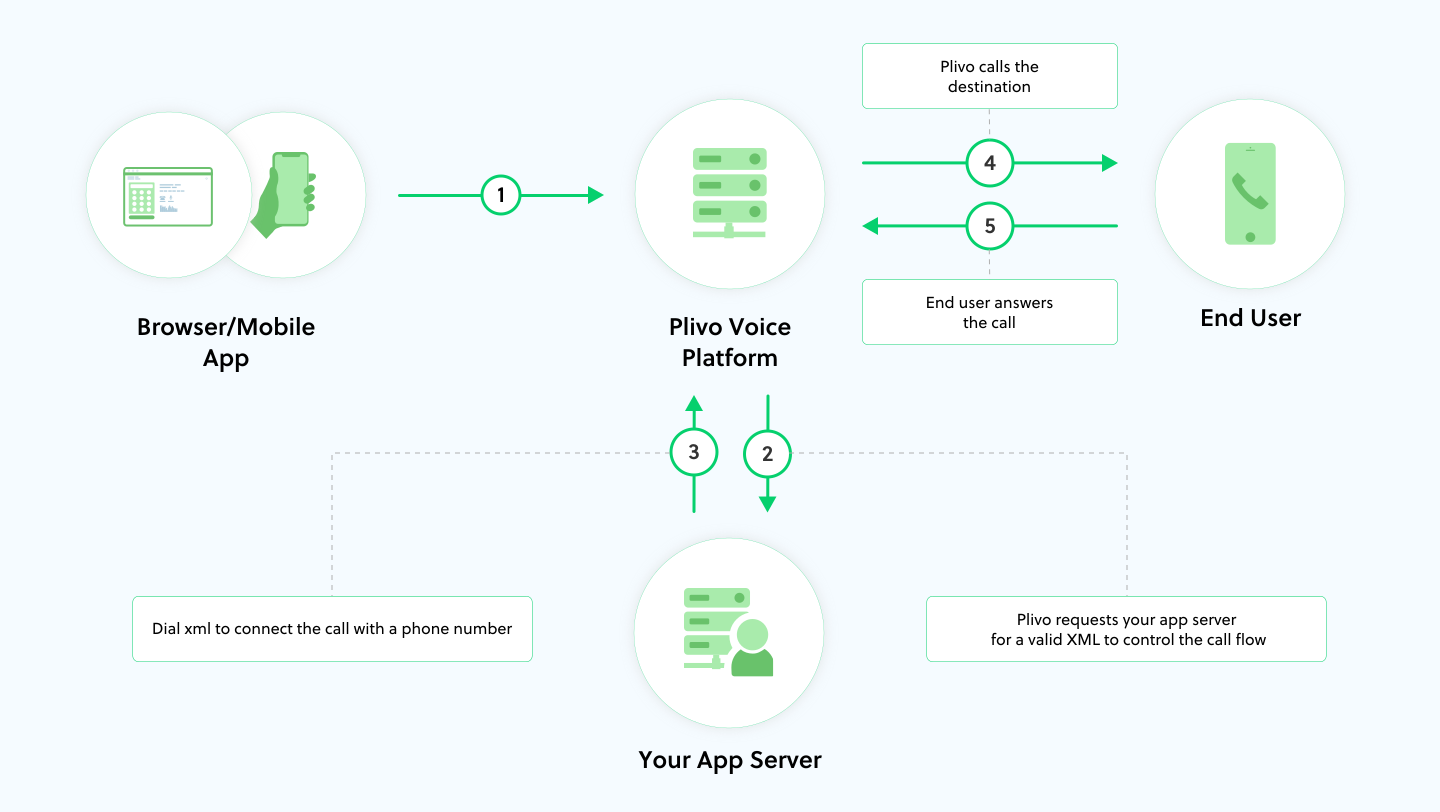
- A browser or mobile app initiates a call to Plivo.
- Plivo notifies your application server about the call.
- Plivo handles the call based on the XML returned by the application server. In this case, the application server returns a Dial XML element with instructions to connect the call with a specified phone number.
- Plivo initiates a call to the phone number specified in the Dial XML.
- Once the call is answered, the two parties are connected.
Note: There are two distinct call legs involved in this call flow.
*A leg: The internet call between the browser or mobile app and Plivo. These types of calls are categorized as “Client SDK (browser, mobile) and SIP calls” on our pricing page.
*B leg: The outbound call from Plivo to the destination specified in the Dial XML.
Controlling calls programmatically
Plivo XML lets you programmatically provide Plivo with instructions to control outbound and inbound calls. Once a call is answered, Plivo invokes a specified URL to request an XML document to be used to process the call. Plivo provides XML elements to handle call flow synchronously and to perform actions such as- Playing music while a caller is on hold.
- Reading out specified text to a caller.
- Accepting numeric and speech input.
- Dialing and connecting to another number.
How to control outbound API calls with Plivo XML
An application can initiate an outbound call through an API request to Plivo. When the call is answered, Plivo invokes the application service endpoint given in theanswer_url API request parameter, which carries instructions to control the call. For example, you could return a Speak XML or Play XML element to play a prompt when the call is answered.
How to control incoming calls with Plivo XML
When someone dials a Plivo phone number, theanswer_url parameter configured for the Plivo application associated with the number is triggered. Details about the incoming call, such as the from and to numbers, are included in the request to the answer_url.
You can control internet calls initiated by Plivo endpoints (from browser and mobile apps) in the same way. These calls invoke the answer_url of the Plivo application associated with the endpoint.
Asynchronous call management with Plivo’s REST APIs
By using Plivo’s REST APIs, you can asynchronously manage calls by setting API requests to perform various actions on ongoing calls. These actions include playing an audio file, playing a text-to-speech message, recording calls and conferences, and transferring calls.Call management features
Here are some basic call management examples to help you learn about Plivo’s XML and API capabilities, and see how to use Plivo to manage call flows.Play a prerecorded audio or text-to-speech prompt
-
Use the Play XML element to play a prerecorded MP3 or WAV audio file on the call.
-
Use the Speak XML element to play a text-to-speech prompt on an ongoing call. This is useful for instances in which you dynamically change the prerecorded message for each call.
-
You can use SSML to control the pronunciation, pitch, volume, and other aspects of the machine voice generated by Plivo.
- Use the Play API to play an audio file (MP3 or WAV format), or use the Speak API to play spoken versions of text, on an ongoing call asynchronously — for example, to play notifications to users waiting on a call.
Build an interactive voice response system
-
You can use the GetInput XML element to build an interactive voice response (IVR) system that prompts callers for input, then responds based on keys pressed by the caller.
-
You can also use the GetInput element to collect speech inputs from callers in real time. Plivo’s automatic speech recognition (ASR) engine instantly transcribes the caller’s speech into text, so you can build intelligent systems that respond based on what a caller speaks.
Call forwarding
Call forwarding lets you dynamically route incoming calls to available agents, extensions, or departments. You can use the Dial XML element to forward a call to a number or to a Plivo endpoint on a browser or iOS or Android app. You can use the Dial element for call hunting or to attempt to connect to multiple numbers or endpoints. This response, for instance, connects a caller to the first number or endpoint that answers the call.Conferences and multiparty calls
The Conference XML element hosts a conference call to which multiple participants can be added at the same time. Plivo conferences offer a wide array of features and cater to a variety of use cases involving multiple participants. Explore all the features that conferences provide in our Conference API and Member API reference pages. You can also use the Conference element to create waiting rooms for callers before connecting them with an available agent.Recording calls
- You can record all or part of an ongoing call asynchronously using Plivo’s Record API, and record ongoing conference calls using the Record Conference API.
-
You can record a complete call session or implement virtual voice mail boxes using the Record XML element.
- Recordings are securely stored on the Plivo platform. You can access or delete recordings at any time by using the retrieve recording API and delete recording API.