Overview
You may want to have an application dial out for someone, so that it calls them on their phone, then connects them to the number they want. This involves three tasks:- Make an outbound call to a caller.
- When the call recipient answers the phone, place a new call to a different number (second user).
- Bridge the calls (first and second user) after the second user answers.
- Using PHLO
- Using XML
You can create and deploy a PHLO to have an application call someone then connect them to a third party, and you can trigger the PHLO with a few lines of code.To create a PHLO, visit the PHLO page of the Plivo console. If this is your first PHLO, the PHLO page will be empty.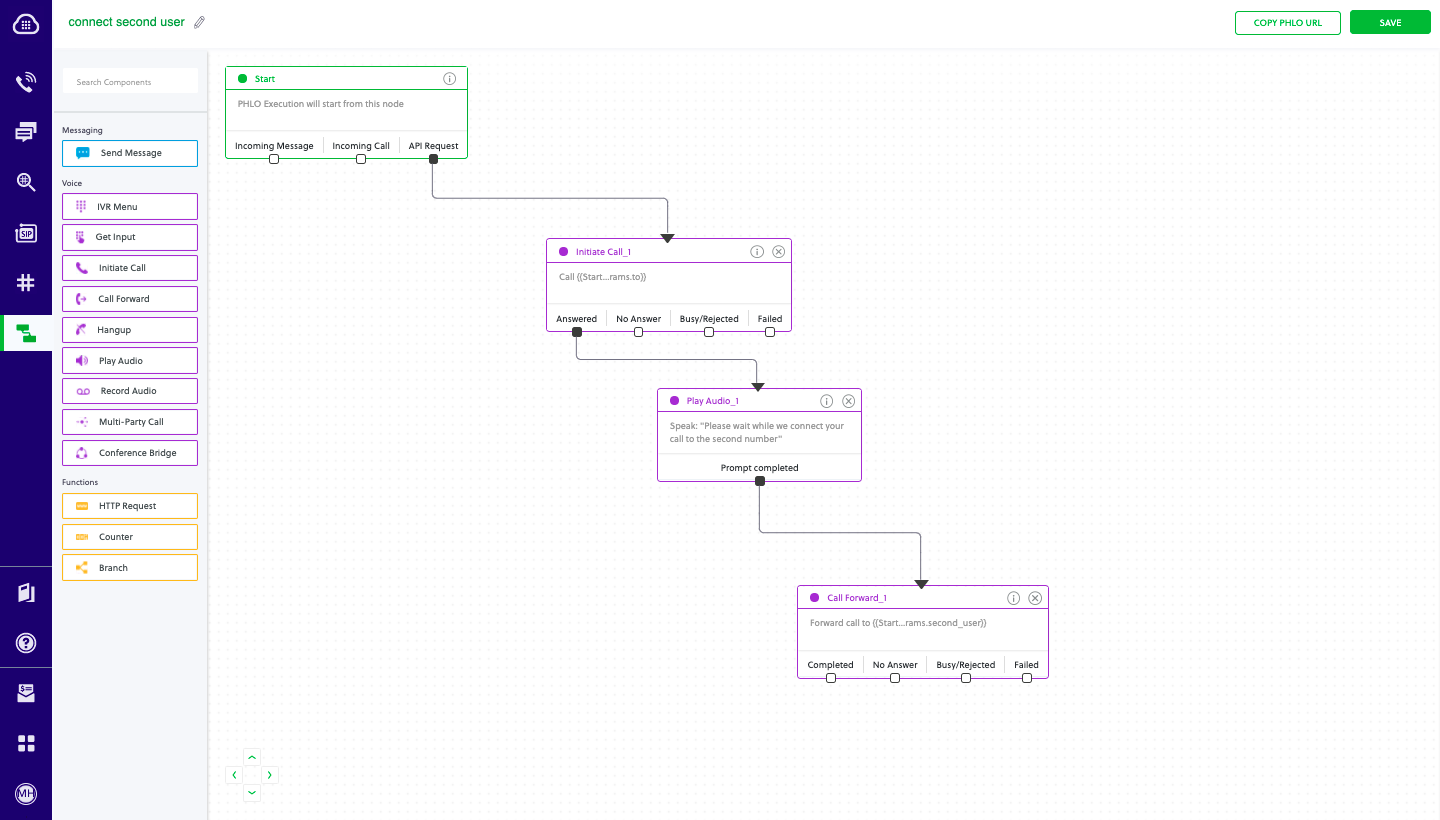
Prerequisites
To get started, you need a Plivo account — sign up with your work email address if you don’t have one already. If this is your first time using Plivo APIs, follow our instructions to set up a PHP development environment and a web server and safely expose that server to the internet.Create the PHLO
- Click Create New PHLO.
-
In the Choose your use case pop-up, click Build my own. The PHLO canvas will appear with the Start node.
Note: The Start node is the starting point of any PHLO. It lets you trigger a PHLO to start upon one of three actions: incoming SMS message, incoming call, or API request.
- Click the Start node to open the Configuration tab, and then enter the information to retrieve from the HTTP Request payload — in this case key names for the From and To numbers and the second user‘s number.
- Validate the configuration by clicking Validate. Do the same for each node as you go along.
- From the list of components on the left side, drag and drop the Initiate Call component onto the canvas. This adds an Initiate Call node onto the canvas. When a component is placed on the canvas it becomes a node.
- Draw a line to connect the Start node’s API Request trigger state to the Initiate Call node.
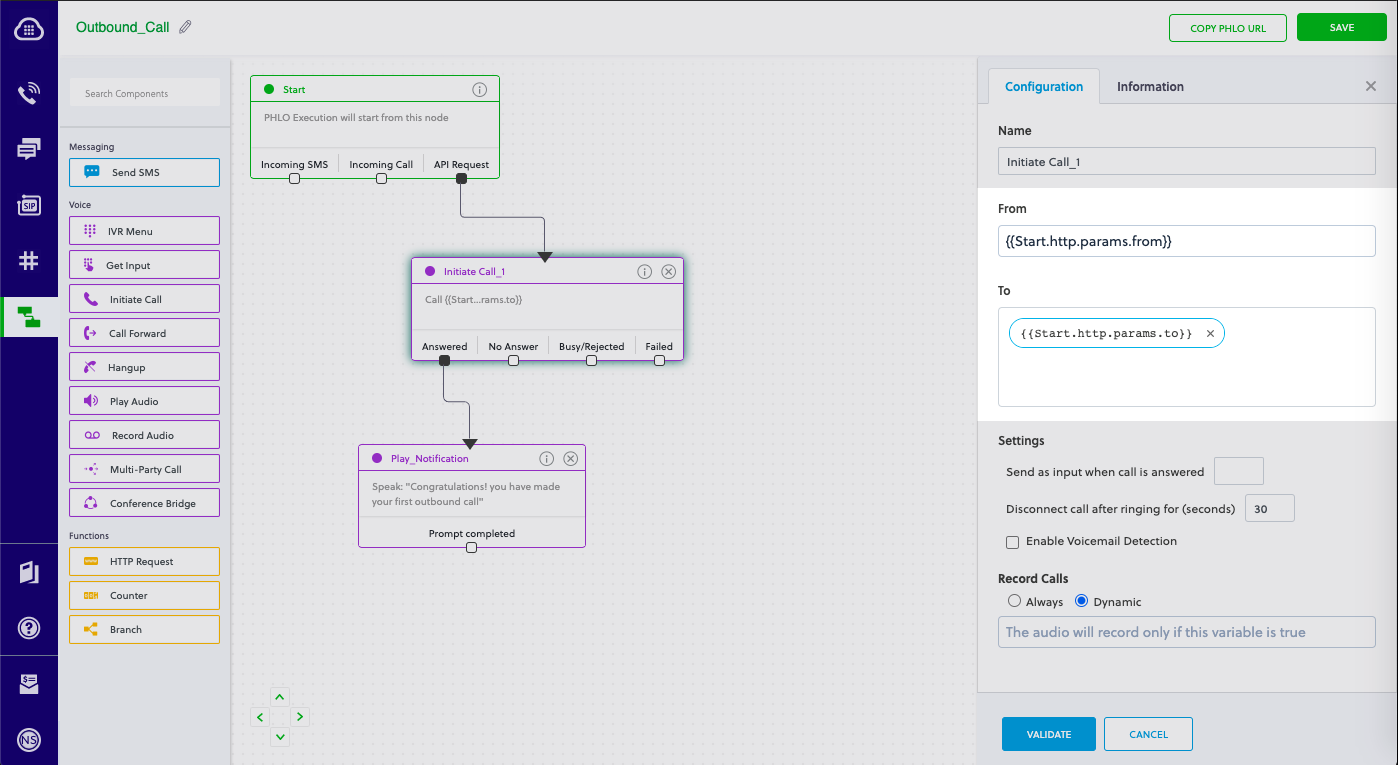
- In the Configuration tab of the Initiate Call node, give the node a name. To enter values for the From and To fields, enter two curly brackets to view all available variables, and choose the appropriate ones. The values for the numbers will be retrieved from the HTTP Request payload you defined in the Start node.
- From the list of components on the left side, drag and drop the Play Audio component onto the canvas. Draw a line to connect the Answered trigger state of the Initiate Call node with the Play Audio node.
- Configure the Play Audio node to play a message to the user by entering text in the Speak Text box in the Prompt section of the Configuration pane. Enter a static message — for example, “Please wait while we connect your call to the second number.”
- From the list of components on the left side, drag and drop the Call Forward component onto the canvas.
- Draw a line to connect the Prompt Completed trigger state of the Play Audio with the Call Forward node.
- In the Configuration tab of the Call Forward node, give the node a name. To enter values for the From and To fields, enter two curly brackets to view all available variables, and choose the appropriate ones. The values for the numbers will be retrieved from the HTTP Request payload you defined in the Start node.
- After you complete and validate the node configurations, give the PHLO a name by clicking in the upper left, then click Save.
Trigger the PHLO
You integrate a PHLO into your application workflow by making an API request to trigger the PHLO with the required payload — the set of parameters you pass to the PHLO. You can define a static payload by specifying values when you create the PHLO, or, as we do here, define a dynamic payload by passing values through parameters when you trigger the PHLO from your application.With dynamic payload
To use dynamic values for the parameters, use Liquid templating parameters when you create the PHLO and pass the values from your code to the PHLO when you trigger it.Code
Create a Java class calledTriggerPhlo and paste into it this code.