> ## Documentation Index
> Fetch the complete documentation index at: https://plivo.com/docs/llms.txt
> Use this file to discover all available pages before exploring further.
# Verify Overview
> Send and validate OTPs for two-factor authentication via SMS and voice
The **Plivo Verify API** enables programmatic user authentication via **2FA** (Two-Factor Authentication) using **SMS** and **voice calls**. With just a few simple steps, you can easily integrate OTP-based verification into your applications.
***
## Verify Eligibility and Coverage
1. **Direct Brands Only** — Verify is offered to direct brands only. Resellers, Independent Software Vendors (ISVs), and aggregators or multi-tenant platforms are **not eligible** for Verify onboarding.
2. **Pay-as-You-Go** — Verify operates on a **pay-as-you-go** model, with no minimum spend commitments for the Verify product itself. Channel-level commitments may apply. Verify uses Plivo-registered Sender IDs to deliver OTP messages. While this setup works globally, some countries may experience reduced delivery quality and require **independent Sender ID registration**, which is subject to minimum commit requirements [as per messaging guidelines](/messaging/sms-availability).
3. **India Delivery via ILDO** — Plivo does **not support SMS to India over domestic routes (DLT)**. Verify traffic to India will be sent via **International Long Distance Operator (ILDO) routes**, starting at **USD 0.08 per message**.
***
## Quick Start
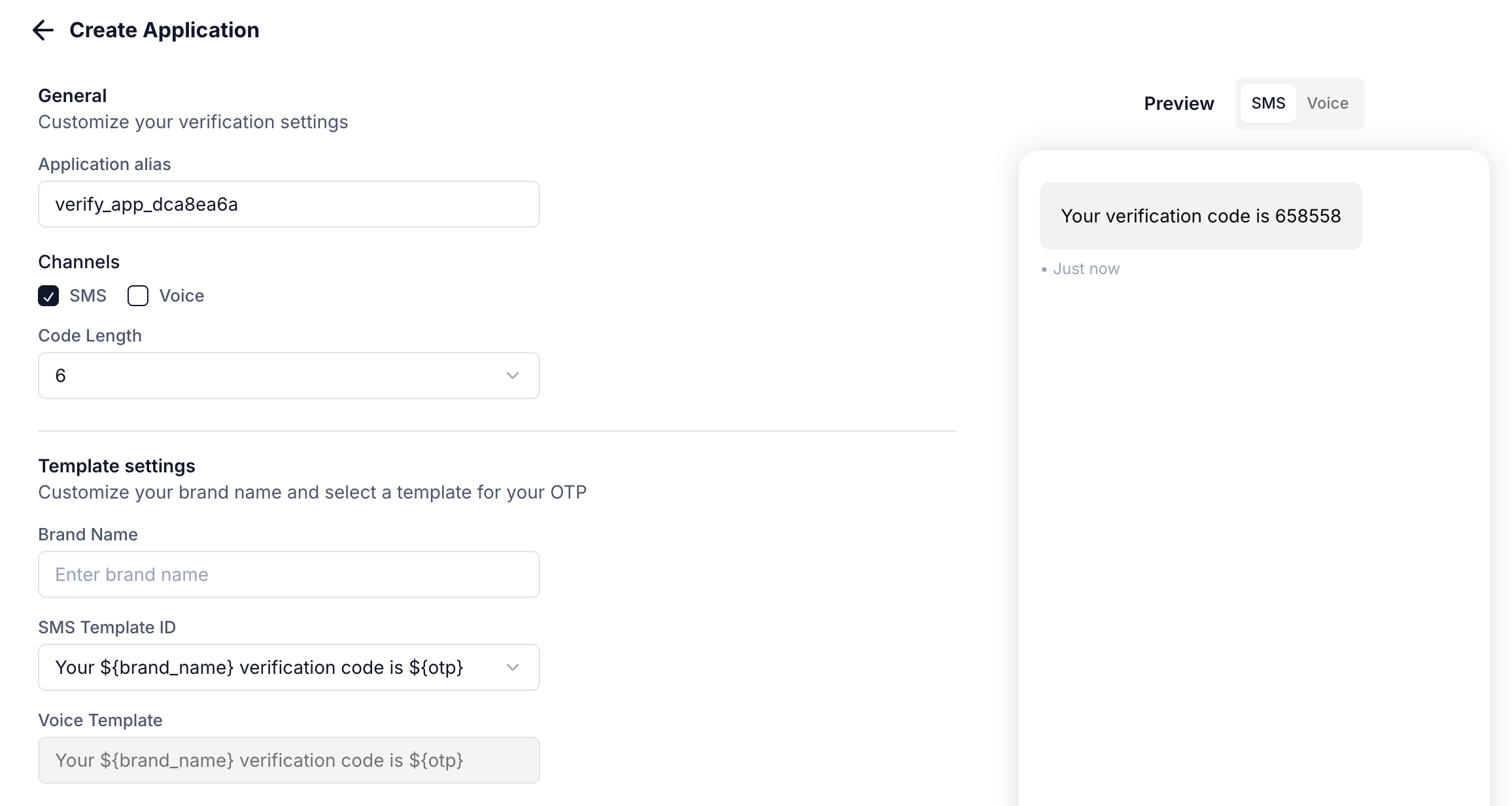
To start sending OTPs, [create a Verify application](https://cx.plivo.com/verify) in the Plivo Console.
Configure these settings:
| Setting | Description |
| ------------------- | --------------------------------------------------------------------- |
| **Alias** | Friendly name for your application |
| **Brand name** | Your brand name shown in messages |
| **Code length** | Number of digits in the OTP (4-8) |
| **Expiry** | Time window before the OTP expires |
| **Attempts** | Maximum delivery attempts per session |
| **Template** | Message template (e.g., `Your ${brand} verification code is ${code}`) |
| **Android AppHash** | Hash string for automatic SMS verification on Android |
Once created, you'll receive an **Application UUID** to use in API requests.
 Use the [Create Session API](/programmable-api/verify/sessions#create-a-session) to send an OTP:
```python Python theme={null}
import plivo
client = plivo.RestClient('', '')
response = client.verify_session.create(
recipient='',
app_uuid='',
channel='sms',
url='https://your-domain.com/callback',
method='POST'
)
print(f"Session UUID: {response.session_uuid}")
```
```javascript Node.js theme={null}
const plivo = require('plivo');
const client = new plivo.Client('', '');
client.verify_session.create({
recipient: '',
app_uuid: '',
channel: 'sms',
url: 'https://your-domain.com/callback',
method: 'POST'
}).then(response => {
console.log(`Session UUID: ${response.sessionUuid}`);
});
```
```ruby Ruby theme={null}
require 'plivo'
client = Plivo::RestClient.new('', '')
response = client.verify_session.create(
recipient: '',
app_uuid: '',
channel: 'sms',
url: 'https://your-domain.com/callback',
method: 'POST'
)
puts "Session UUID: #{response.session_uuid}"
```
```bash cURL theme={null}
curl -X POST "https://api.plivo.com/v1/Account/{auth_id}/Verify/Session/" \
-u "{auth_id}:{auth_token}" \
-H "Content-Type: application/json" \
-d '{
"recipient": "",
"app_uuid": "",
"channel": "sms",
"url": "https://your-domain.com/callback",
"method": "POST"
}'
```
Set a callback URL to receive real-time delivery status updates.
When the user enters the OTP, validate it using the [Validate Session API](/programmable-api/verify/sessions#validate-a-session):
```python Python theme={null}
import plivo
client = plivo.RestClient('', '')
response = client.verify_session.validate(
session_uuid='',
otp=''
)
print(f"Status: {response.message}")
```
```javascript Node.js theme={null}
const plivo = require('plivo');
const client = new plivo.Client('', '');
client.verify_session.validate({
id: '',
otp: ''
}).then(response => {
console.log(`Status: ${response}`);
});
```
```ruby Ruby theme={null}
require 'plivo'
client = Plivo::RestClient.new('', '')
response = client.verify_session.validate('', '')
puts "Status: #{response}"
```
```bash cURL theme={null}
curl -X POST "https://api.plivo.com/v1/Account/{auth_id}/Verify/Session/{session_uuid}/" \
-u "{auth_id}:{auth_token}" \
-H "Content-Type: application/json" \
-d '{"otp": ""}'
```
If the OTP is valid, allow the user to proceed. If invalid, prompt them to re-enter or resend the OTP.
***
## Channels: SMS vs Voice
The Verify API supports two delivery channels:
| Channel | When to Use |
| --------- | --------------------------------------------------------------------------------- |
| **SMS** | Default choice. Fast, familiar, works on all phones. |
| **Voice** | Users without SMS capability, accessibility needs, or as fallback when SMS fails. |
### Using Voice OTP
To send OTP via voice call, set `channel` to `voice`:
```python Python theme={null}
response = client.verify_session.create(
recipient='+14155551234',
app_uuid='',
channel='voice', # Voice call instead of SMS
url='https://your-domain.com/callback'
)
```
```bash cURL theme={null}
curl -X POST "https://api.plivo.com/v1/Account/{auth_id}/Verify/Session/" \
-u "{auth_id}:{auth_token}" \
-H "Content-Type: application/json" \
-d '{
"recipient": "+14155551234",
"app_uuid": "",
"channel": "voice"
}'
```
The user receives an automated voice call that reads out their OTP code.
### Channel Fallback Strategy
For critical verifications, implement fallback:
```python theme={null}
# Try SMS first
response = client.verify_session.create(
recipient=phone,
app_uuid=app_uuid,
channel='sms'
)
# If SMS fails or times out, retry with voice
if response.status == 'failed':
response = client.verify_session.create(
recipient=phone,
app_uuid=app_uuid,
channel='voice'
)
```
***
## Sessions
A **session** represents a single verification interaction with a user. Each session can have multiple delivery attempts.
**Example:** You send an OTP at 10:00 AM with a 10-minute expiry. This creates a session that expires at 10:10 AM. All delivery attempts during this window are part of the same session and deliver the same OTP.
### Session Lifecycle
1. **Created** - OTP generated and first delivery attempted
2. **In Progress** - Waiting for user to enter OTP (additional attempts possible)
3. **Verified** - User entered correct OTP
4. **Expired** - Session timed out without successful validation
***
## Fraud Shield
Fraud Shield protects your applications from [SMS pumping](https://www.plivo.com/blog/sms-pumping/) attacks by monitoring traffic in real-time and blocking suspicious messages.
### Protection Levels
| Level | Description |
| ---------- | -------------------------------------------------------------------------------- |
| **High** | Strongest filtering, best for high-risk scenarios. May have more false positives |
| **Medium** | Balanced filtering (default). Fewer false positives |
| **Low** | Minimal filtering for apps with higher fraud tolerance |
Configure in **Console > Verify > App Settings > Fraud Shield**.
Blocked messages return **error code 452** (Potential SMS Pumping).
### Preventing False Positives
1. **Skip fraud check for trusted users** - Set `check_fs=false` for known good users
2. **Create separate apps** - Use different apps for Sign Up, Sign In, and Password Reset
3. **Use a dedicated low-protection app** - For trusted user segments, create an app with Fraud Shield set to Low or Disabled
***
## Signature Validation
Validate that webhook requests originate from Plivo using signature verification.
### HTTP Headers
All Plivo requests include:
* `X-Plivo-Signature-V2` - Generated using account/subaccount Auth Token
* `X-Plivo-Signature-Ma-V2` - Always generated using main account Auth Token
* `X-Plivo-Signature-V2-Nonce` - Unique nonce for the request
### Generating the Signature
Calculate HMAC with:
* **Key:** Your Plivo Auth Token
* **Message:** Base URI + X-Plivo-Signature-V2-Nonce (e.g., `https://yourdomain.com/callback/05429567804466091622`)
* **Hash function:** SHA256
### Example
```python Python theme={null}
from flask import Flask, request
import plivo
app = Flask(__name__)
@app.route('/receive_callback/', methods=['POST'])
def validate():
signature = request.headers.get('X-Plivo-Signature-V2')
nonce = request.headers.get('X-Plivo-Signature-V2-Nonce')
uri = request.url
auth_token = ""
is_valid = plivo.utils.validate_signature(uri, nonce, signature, auth_token)
print(f"Signature valid: {is_valid}")
return "OK"
```
```javascript Node.js theme={null}
const plivo = require('plivo');
const express = require('express');
const app = express();
app.post('/receive_callback/', (req, res) => {
const auth_token = '';
const signature = req.get('X-Plivo-Signature-V2');
const nonce = req.get('X-Plivo-Signature-V2-Nonce');
const url = req.protocol + '://' + req.get('host') + req.originalUrl;
const isValid = plivo.validateSignature(url, nonce, signature, auth_token);
console.log('Signature valid:', isValid);
res.send('OK');
});
```
```ruby Ruby theme={null}
require 'sinatra'
require 'plivo'
get '/receive_callback/' do
auth_token = ""
signature = request.env["HTTP_X_PLIVO_SIGNATURE_V2"]
nonce = request.env["HTTP_X_PLIVO_SIGNATURE_V2_NONCE"]
uri = request.url.split("?")[0]
is_valid = Plivo::Utils.valid_signature?(uri, nonce, signature, auth_token)
puts "Signature valid: #{is_valid}"
"OK"
end
```
```go Go theme={null}
package main
import (
"fmt"
"net/http"
"github.com/plivo/plivo-go/v7"
)
func handler(w http.ResponseWriter, r *http.Request) {
url := "https://" + r.Host + r.URL.Path
authToken := ""
signature := r.Header.Get("X-Plivo-Signature-V2")
nonce := r.Header.Get("X-Plivo-Signature-V2-Nonce")
isValid := plivo.ValidateSignatureV2(url, nonce, signature, authToken)
fmt.Printf("Signature valid: %v\n", isValid)
}
```
***
## Translation Support
Send verification messages in your users' preferred languages.
1. Contact [Plivo support](https://support.plivo.com/hc/en-us) to configure translations for your SMS templates
2. Pass the `locale` parameter when creating a session
### Locale Format
Combine language code (ISO 639-1) and optional region code (ISO 3166-1):
* `en` - English
* `en_US` - English (US)
* `es` - Spanish
* `fr_FR` - French (France)
If the specified locale is unavailable or invalid, the default locale (`en`) is used.
***
## When to Use Multiple Applications
Most businesses need just one Verify application. Consider multiple applications when:
* Different OTP lengths are needed (e.g., 4-digit for login, 6-digit for checkout)
* Different channels are required (SMS-only for logins, SMS+voice for payments)
* Different Fraud Shield settings are needed per use case
***
## Reporting
View and analyze your verification traffic on the Plivo console at **Verify > [Logs](https://cx.plivo.com/logs)**.
### Session Logs
| Field | Description |
| ----------------- | --------------------------------------- |
| Date | When the session was created |
| UUID | Unique session identifier |
| Application Alias | Name of the application used |
| Recipient | Destination phone number |
| Status | `in-progress`, `verified`, or `expired` |
| Attempts | Number of delivery attempts |
| Country | Destination country |
| Total Charge | Session cost including channel fees |
### Filters
Filter results by subaccount, date range, status, country, phone number, or application alias.
Session data is retained for 90 days.
***
## Related
* [Session API Reference](/programmable-api/verify/sessions) - Full API documentation
* [API Overview](/programmable-api/verify/api-overview) - Authentication and request format
Use the [Create Session API](/programmable-api/verify/sessions#create-a-session) to send an OTP:
```python Python theme={null}
import plivo
client = plivo.RestClient('', '')
response = client.verify_session.create(
recipient='',
app_uuid='',
channel='sms',
url='https://your-domain.com/callback',
method='POST'
)
print(f"Session UUID: {response.session_uuid}")
```
```javascript Node.js theme={null}
const plivo = require('plivo');
const client = new plivo.Client('', '');
client.verify_session.create({
recipient: '',
app_uuid: '',
channel: 'sms',
url: 'https://your-domain.com/callback',
method: 'POST'
}).then(response => {
console.log(`Session UUID: ${response.sessionUuid}`);
});
```
```ruby Ruby theme={null}
require 'plivo'
client = Plivo::RestClient.new('', '')
response = client.verify_session.create(
recipient: '',
app_uuid: '',
channel: 'sms',
url: 'https://your-domain.com/callback',
method: 'POST'
)
puts "Session UUID: #{response.session_uuid}"
```
```bash cURL theme={null}
curl -X POST "https://api.plivo.com/v1/Account/{auth_id}/Verify/Session/" \
-u "{auth_id}:{auth_token}" \
-H "Content-Type: application/json" \
-d '{
"recipient": "",
"app_uuid": "",
"channel": "sms",
"url": "https://your-domain.com/callback",
"method": "POST"
}'
```
Set a callback URL to receive real-time delivery status updates.
When the user enters the OTP, validate it using the [Validate Session API](/programmable-api/verify/sessions#validate-a-session):
```python Python theme={null}
import plivo
client = plivo.RestClient('', '')
response = client.verify_session.validate(
session_uuid='',
otp=''
)
print(f"Status: {response.message}")
```
```javascript Node.js theme={null}
const plivo = require('plivo');
const client = new plivo.Client('', '');
client.verify_session.validate({
id: '',
otp: ''
}).then(response => {
console.log(`Status: ${response}`);
});
```
```ruby Ruby theme={null}
require 'plivo'
client = Plivo::RestClient.new('', '')
response = client.verify_session.validate('', '')
puts "Status: #{response}"
```
```bash cURL theme={null}
curl -X POST "https://api.plivo.com/v1/Account/{auth_id}/Verify/Session/{session_uuid}/" \
-u "{auth_id}:{auth_token}" \
-H "Content-Type: application/json" \
-d '{"otp": ""}'
```
If the OTP is valid, allow the user to proceed. If invalid, prompt them to re-enter or resend the OTP.
***
## Channels: SMS vs Voice
The Verify API supports two delivery channels:
| Channel | When to Use |
| --------- | --------------------------------------------------------------------------------- |
| **SMS** | Default choice. Fast, familiar, works on all phones. |
| **Voice** | Users without SMS capability, accessibility needs, or as fallback when SMS fails. |
### Using Voice OTP
To send OTP via voice call, set `channel` to `voice`:
```python Python theme={null}
response = client.verify_session.create(
recipient='+14155551234',
app_uuid='',
channel='voice', # Voice call instead of SMS
url='https://your-domain.com/callback'
)
```
```bash cURL theme={null}
curl -X POST "https://api.plivo.com/v1/Account/{auth_id}/Verify/Session/" \
-u "{auth_id}:{auth_token}" \
-H "Content-Type: application/json" \
-d '{
"recipient": "+14155551234",
"app_uuid": "",
"channel": "voice"
}'
```
The user receives an automated voice call that reads out their OTP code.
### Channel Fallback Strategy
For critical verifications, implement fallback:
```python theme={null}
# Try SMS first
response = client.verify_session.create(
recipient=phone,
app_uuid=app_uuid,
channel='sms'
)
# If SMS fails or times out, retry with voice
if response.status == 'failed':
response = client.verify_session.create(
recipient=phone,
app_uuid=app_uuid,
channel='voice'
)
```
***
## Sessions
A **session** represents a single verification interaction with a user. Each session can have multiple delivery attempts.
**Example:** You send an OTP at 10:00 AM with a 10-minute expiry. This creates a session that expires at 10:10 AM. All delivery attempts during this window are part of the same session and deliver the same OTP.
### Session Lifecycle
1. **Created** - OTP generated and first delivery attempted
2. **In Progress** - Waiting for user to enter OTP (additional attempts possible)
3. **Verified** - User entered correct OTP
4. **Expired** - Session timed out without successful validation
***
## Fraud Shield
Fraud Shield protects your applications from [SMS pumping](https://www.plivo.com/blog/sms-pumping/) attacks by monitoring traffic in real-time and blocking suspicious messages.
### Protection Levels
| Level | Description |
| ---------- | -------------------------------------------------------------------------------- |
| **High** | Strongest filtering, best for high-risk scenarios. May have more false positives |
| **Medium** | Balanced filtering (default). Fewer false positives |
| **Low** | Minimal filtering for apps with higher fraud tolerance |
Configure in **Console > Verify > App Settings > Fraud Shield**.
Blocked messages return **error code 452** (Potential SMS Pumping).
### Preventing False Positives
1. **Skip fraud check for trusted users** - Set `check_fs=false` for known good users
2. **Create separate apps** - Use different apps for Sign Up, Sign In, and Password Reset
3. **Use a dedicated low-protection app** - For trusted user segments, create an app with Fraud Shield set to Low or Disabled
***
## Signature Validation
Validate that webhook requests originate from Plivo using signature verification.
### HTTP Headers
All Plivo requests include:
* `X-Plivo-Signature-V2` - Generated using account/subaccount Auth Token
* `X-Plivo-Signature-Ma-V2` - Always generated using main account Auth Token
* `X-Plivo-Signature-V2-Nonce` - Unique nonce for the request
### Generating the Signature
Calculate HMAC with:
* **Key:** Your Plivo Auth Token
* **Message:** Base URI + X-Plivo-Signature-V2-Nonce (e.g., `https://yourdomain.com/callback/05429567804466091622`)
* **Hash function:** SHA256
### Example
```python Python theme={null}
from flask import Flask, request
import plivo
app = Flask(__name__)
@app.route('/receive_callback/', methods=['POST'])
def validate():
signature = request.headers.get('X-Plivo-Signature-V2')
nonce = request.headers.get('X-Plivo-Signature-V2-Nonce')
uri = request.url
auth_token = ""
is_valid = plivo.utils.validate_signature(uri, nonce, signature, auth_token)
print(f"Signature valid: {is_valid}")
return "OK"
```
```javascript Node.js theme={null}
const plivo = require('plivo');
const express = require('express');
const app = express();
app.post('/receive_callback/', (req, res) => {
const auth_token = '';
const signature = req.get('X-Plivo-Signature-V2');
const nonce = req.get('X-Plivo-Signature-V2-Nonce');
const url = req.protocol + '://' + req.get('host') + req.originalUrl;
const isValid = plivo.validateSignature(url, nonce, signature, auth_token);
console.log('Signature valid:', isValid);
res.send('OK');
});
```
```ruby Ruby theme={null}
require 'sinatra'
require 'plivo'
get '/receive_callback/' do
auth_token = ""
signature = request.env["HTTP_X_PLIVO_SIGNATURE_V2"]
nonce = request.env["HTTP_X_PLIVO_SIGNATURE_V2_NONCE"]
uri = request.url.split("?")[0]
is_valid = Plivo::Utils.valid_signature?(uri, nonce, signature, auth_token)
puts "Signature valid: #{is_valid}"
"OK"
end
```
```go Go theme={null}
package main
import (
"fmt"
"net/http"
"github.com/plivo/plivo-go/v7"
)
func handler(w http.ResponseWriter, r *http.Request) {
url := "https://" + r.Host + r.URL.Path
authToken := ""
signature := r.Header.Get("X-Plivo-Signature-V2")
nonce := r.Header.Get("X-Plivo-Signature-V2-Nonce")
isValid := plivo.ValidateSignatureV2(url, nonce, signature, authToken)
fmt.Printf("Signature valid: %v\n", isValid)
}
```
***
## Translation Support
Send verification messages in your users' preferred languages.
1. Contact [Plivo support](https://support.plivo.com/hc/en-us) to configure translations for your SMS templates
2. Pass the `locale` parameter when creating a session
### Locale Format
Combine language code (ISO 639-1) and optional region code (ISO 3166-1):
* `en` - English
* `en_US` - English (US)
* `es` - Spanish
* `fr_FR` - French (France)
If the specified locale is unavailable or invalid, the default locale (`en`) is used.
***
## When to Use Multiple Applications
Most businesses need just one Verify application. Consider multiple applications when:
* Different OTP lengths are needed (e.g., 4-digit for login, 6-digit for checkout)
* Different channels are required (SMS-only for logins, SMS+voice for payments)
* Different Fraud Shield settings are needed per use case
***
## Reporting
View and analyze your verification traffic on the Plivo console at **Verify > [Logs](https://cx.plivo.com/logs)**.
### Session Logs
| Field | Description |
| ----------------- | --------------------------------------- |
| Date | When the session was created |
| UUID | Unique session identifier |
| Application Alias | Name of the application used |
| Recipient | Destination phone number |
| Status | `in-progress`, `verified`, or `expired` |
| Attempts | Number of delivery attempts |
| Country | Destination country |
| Total Charge | Session cost including channel fees |
### Filters
Filter results by subaccount, date range, status, country, phone number, or application alias.
Session data is retained for 90 days.
***
## Related
* [Session API Reference](/programmable-api/verify/sessions) - Full API documentation
* [API Overview](/programmable-api/verify/api-overview) - Authentication and request format