> ## Documentation Index
> Fetch the complete documentation index at: https://plivo.com/docs/llms.txt
> Use this file to discover all available pages before exploring further.
# Overview
> Control SMS messages synchronously using Plivo XML
Your application must use Plivo XML to control SMS messages synchronously. You can use the Message XML element to send an SMS message in different scenarios — for example, to reply to or forward an incoming message.
***
## How It Works
Let's look at an example to see how Plivo XML works. Consider a use case where you want to reply to an incoming SMS message.
This diagram outlines the message flow for a typical case where XML is used:
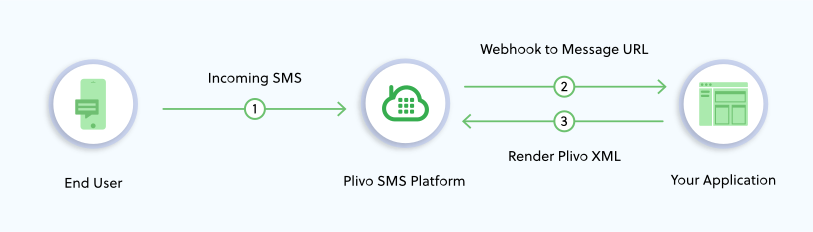 An incoming SMS message is received on a Plivo number and is connected through the Plivo SMS Platform. Plivo then looks up the `message_url` configured for the Application that's linked to the Plivo number and makes a request to that URL. Your web application at that URL should return an XML document that provides instructions to the Plivo API on how the SMS message should be handled. In this case, it should return a message XML document to reply to the incoming SMS message.
In this example, Plivo works like an HTTP client that receives a message and and makes a request to your web application for instructions on how to handle the message. By default, XML requests to your application are made via `POST`, but you can configure Plivo to make XML requests to your application via HTTP `GET` or `POST` methods by changing the related configuration parameter.
You can set configuration parameters when sending out a message. To deal with incoming messages, Plivo uses the configuration attached to the application that's linked to the phone number on which your incoming message is received.
***
## XML Request
When Plivo makes a synchronous HTTP request to your application, the API expects an XML document in response. Plivo also sends a few parameters with the HTTP request that your application can act upon before responding.
### Incoming Message Parameters
To receive a message, your Plivo [Application](/account/api/application/) must have a `message_url`. Plivo expects an XML response from this URL after it sends the parameters below. Only a `Message` XML element can be sent as a response from the message URL.
| Parameter | Description |
| ----------- | --------------------------------------------- |
| From | The source number of the message. |
| To | The number to which the message was sent. |
| Type | The type of the message. Allowed value: `sms` |
| Text | The message content. |
| MessageUUID | A unique ID for the message. |
### Signature Validation
All requests made by Plivo to your server URLs consist of `X-Plivo-Signature-V2` and `X-Plivo-Signature-V2-Nonce` HTTP headers. To validate a request and to verify that the request to your server originated from Plivo, you must generate a signature at your end and compare it with `X-Plivo-Signature-V2` parameter in the HTTP header to check whether they match. [Read more about signature validation](/voice/concepts/signature-validation/).
Methods to compute and verify X-Plivo-Signature-V2 are available in the latest [server SDKs](/sdk/server/). Choose the SDK for the programming language of your choice to see how to use these methods.
#### Signature Validation Arguments
| Name | Type | Description |
| ----------------------------------------------- | ------ | ------------------------------------------------------------------------------------------------------------------------------- |
| uri | string | The callback that you want to validate. Allowed values: `answer_url`, `message_url`, `callback_url`, `action_url`, `hangup_url` |
| X-Plivo-Signature-V2-Nonce | string | Random numeric digits posted to the `callback_url`, used for validation purposes. |
| X-Plivo-Signature-V2 or X-Plivo-Signature-Ma-V2 | string | Random alphanumeric characters used for validation. You can get this from the relevant event details posted to your callback. |
| auth\_token | string | Your account Auth Token, which you can find on the Overview page of the [Plivo console](https://cx.plivo.com/home). |
**Note**: You can either use `X-Plivo-Signature-V2` or `X-Plivo-Signature-Ma-V2` to validate the signature.
* `X-Plivo-Signature-V2` is generated using the Auth Token of the associated account or subaccount. To validate using the `X-Plivo-Signature-V2` request header, generate the signature at your end using the same account or subaccount.
* `X-Plivo-Signature-Ma-V2` is always generated using the Auth Token of the account. To validate using the `X-Plivo-Signature-Ma-V2` request header, generate the signature using the main account.
```python Python theme={null}
from flask import Flask, request, make_response, url_for
import plivo
app = Flask(__name__)
@app.route('/receive_sms/', methods =['GET','POST'])
def signature():
signature = request.headers.get('X-Plivo-Signature-V2')
nonce = request.headers.get('X-Plivo-Signature-V2-Nonce')
uri = url_for('signature', _external=True)
auth_token = ""
output = plivo.utils.validate_signature(uri,nonce,signature,auth_token)
print(output)
from_number = request.values.get('From')
to_number = request.values.get('To')
text = request.values.get('Text')
print('Message received - From: %s, To: %s, Text: %s' %(from_number, to_number, text))
return "Text received"
if __name__ == "__main__":
app.run(host='0.0.0.0', debug=True)
```
```javascript Node.js theme={null}
var plivo = require('plivo');
var express = require('express');
var app = express();
app.set('port', (process.env.PORT || 5000));
app.use(express.static(__dirname + '/public'));
app.use(express.urlencoded({ extended: true }))
app.all('/receive_sms/', function(req, res) {
var auth_token = ('');
var signature = req.get('X-Plivo-Signature-V2');
var nonce = req.get('X-Plivo-Signature-V2-Nonce');
var fullUrl = req.protocol + '://' + req.get('host') + req.originalUrl;
var from_number = req.body.From;
var to_number = req.body.To;
var text = req.body.Text;
var output = plivo.validateSignature(fullUrl, nonce, signature, auth_token)
console.log(output);
console.log ('From : ' + from_number + ' To : ' + to_number + ' Text : ' + text);
});
app.listen(app.get('port'), function() {
console.log('Node app is running on port', app.get('port'));
});
```
```ruby Ruby theme={null}
require 'sinatra'
require 'rubygems'
require 'plivo'
include Plivo
require 'uri'
get '/receive_sms/' do
auth_token = ""
signature = request.env["HTTP_X_PLIVO_SIGNATURE_V2"]
nonce = request.env["HTTP_X_PLIVO_SIGNATURE_V2_NONCE"]
url = request.url
uri = (url.split("?"))[0]
output = Plivo::Utils.valid_signature?(uri,nonce,signature,auth_token)
puts output
from_number = params[:From]
to_number = params[:To]
text = params[:Text]
puts "Message received from #{from_number} : #{ text }"
end
```
```php PHP theme={null}
";
$signature = $_SERVER["HTTP_X_PLIVO_SIGNATURE_V2"];
$nonce = $_SERVER["HTTP_X_PLIVO_SIGNATURE_V2_NONCE"];
$url = 'http' . (isset($_SERVER['HTTPS']) ? 's' : '') . '://' . "{$_SERVER['HTTP_HOST']}{$_SERVER['REQUEST_URI']}";
$uri = explode('?',$url);
$uri1 = $uri[0];
$SVUtil = new signatureValidation();
$output = $SVUtil->validateSignature($uri1,$nonce,$signature,$auth_token);
var_export($output);
$from_number = $_REQUEST["From"];
$to_number = $_REQUEST["To"];
$text = $_REQUEST["Text"];
echo("Message received from $from_number : $text");
?>
```
```java Java theme={null}
package plivoexample;
import com.plivo.api.util.Utils;
import java.io.IOException;
import java.security.InvalidKeyException;
import java.security.NoSuchAlgorithmException;
import javax.servlet.ServletException;
import javax.servlet.http.HttpServlet;
import javax.servlet.http.HttpServletRequest;
import javax.servlet.http.HttpServletResponse;
import org.eclipse.jetty.server.Server;
import org.eclipse.jetty.servlet.ServletContextHandler;
import org.eclipse.jetty.servlet.ServletHolder;
public class validateSignature extends HttpServlet {
private static final long serialVersionUID = 1L;
@Override
protected void doPost(HttpServletRequest req, HttpServletResponse resp)
throws ServletException, IOException {
String auth_token = "";
String signature = req.getHeader("X-Plivo-Signature-V2");
String nonce = req.getHeader("X-Plivo-Signature-V2-Nonce");
String url = req.getRequestURL().toString();
try {
Boolean isValid = XPlivoSignature.verify(url, nonce, signature, auth_token);
System.out.println("Valid : " + isValid);
} catch (PlivoException e) {
e.printStackTrace();
}
String from_number = req.getParameter("From");
String to_number = req.getParameter("To");
String text = req.getParameter("Text");
System.out.println("From : " + from_number + " To : " + to_number + " Text : " + text);
}
public static void main(String[] args) throws Exception {
String port = System.getenv("PORT");
if(port==null)
port ="8080";
Server server = new Server(Integer.valueOf(port));
ServletContextHandler context = new ServletContextHandler(ServletContextHandler.SESSIONS);
context.setContextPath("/");
server.setHandler(context);
context.addServlet(new ServletHolder(new validateSignature()),"/receive_sms");
server.start();
server.join();
}
}
```
```csharp .NET theme={null}
using System;
using System.Collections.Generic;
using System.Diagnostics;
using RestSharp;
using Plivo.Utilities;
using Nancy;
namespace validateSignature
{
public class Program : NancyModule
{
public Program()
{
Get["/receive_sms/"] = x =>
{
IEnumerable signature = Request.Headers["X-Plivo-Signature-V2"];
String[] sign = (String[])signature;
String actualsignature = sign[0];
IEnumerable nonce = Request.Headers["X-Plivo-Signature-V2-Nonce"];
String[] key = (String[])nonce;
String actualnonce = key[0];
String auth_token = "";
String url = Request.Url.SiteBase + Request.Url.Path;
bool valid = Plivo.Utilities.XPlivoSignatureV2.VerifySignature(url, actualnonce, actualsignature, auth_token);
Debug.WriteLine("Valid : " + valid);
String from_number = Request.Query["From"];
String to_number = Request.Query["To"];
String text = Request.Query["Text"];
Debug.WriteLine("From : {0}, To : {1}, Text : {2}", from_number, to_number, text);
Console.ReadLine();
return "OK";
};
}
}
}
```
```go Go theme={null}
package main
import (
"fmt"
"net/http"
"github.com/plivo/plivo-go/v7"
)
func handler(w http.ResponseWriter, r *http.Request) {
originalurl := "https://" + r.Host + r.URL.Path
authToken := ""
signature := r.Header.Get("X-Plivo-Signature-V2")
nonce := r.Header.Get("X-Plivo-Signature-V2-Nonce")
fromnumber := r.FormValue("From")
tonumber := r.FormValue("To")
text := r.FormValue("Text")
response := plivo.ValidateSignatureV2(
originalurl,
nonce,
signature,
authToken,
)
fmt.Printf("Response: %#v\n", response)
print("Message Received - ", fromnumber, " ", tonumber, " ", text)
}
func main() {
http.HandleFunc("/receive_sms/", handler)
http.ListenAndServe(":8080", nil)
}
```
***
## XML Response
When your application gets initiated to send a message, Plivo makes an HTTP request to the `message_url`, which is one of the mandatory parameters when sending a message.
### Requirements
* The `message_url` should respond with an XML document that provides instructions to control the SMS.
* The `Content Type` of the response header, returned by the `message_url`, must be set to `text/xml` or `application/xml`.
* The XML document returned should contain a valid Plivo Message XML element as described below.
### Structuring the XML Document
#### The Parent Element
The `` element is the parent element of Plivo's XML. All child elements must be nested within this element. Any other structure is considered invalid.
#### Child Elements
Child elements are proprietary Plivo elements and are case-sensitive. This means that using `` instead of ``, for example, will result in an error. Attributes for the child elements are also case-sensitive and "camelCased."
When Plivo receives an XML response, it executes the elements from top to bottom.
```xml Example XML Response theme={null}
Hi, Message from Plivo
```
***
## Message Element
Use the Message element to send a message during your call flow. For instance, if you want to send out an SMS notification when you receive an incoming call on your Plivo number, you can use the `` element in your application.
To receive a message, you must set a message URL in your Plivo application [via the API](/account/api/application/) or in the Plivo console at Messaging > [Applications](https://manage.plivo.com/app/).
### Message Attributes
| Name | Type | Description |
| -------------- | ------ | ---------------------------------------------------------------------------------------------------------------------------------------- |
| src | string | Source number — for example, `12025550000`. Must be a purchased, valid number. |
| dst | string | Destination number. Must be a valid number. To use bulk numbers, specify them separated by `<` — for example, `12025551111<12025552222`. |
| type | string | Type of the message. Allowed values: `sms` |
| callbackUrl | string | A valid, reachable URL that Plivo notifies when a response is available and to which the response is sent (Delivery reports). |
| callbackMethod | string | The method used to notify the `callbackUrl`. Allowed values: `GET`, `POST`. Defaults to `POST`. |
### Message Example
This example XML document is used to send out an SMS message. Plivo sends a delivery report to the callback URL using the HTTP POST method.
```python Python theme={null}
from plivo import plivoxml
response = plivoxml.ResponseElement()
response.add(
plivoxml.MessageElement(
'Hi, this is a sample text',
src='+12025550000',
dst='+12025551111',
type='sms',
callback_url='https://.com/sms_status/',
callback_method='POST'))
print(response.to_string())
```
```javascript Node.js theme={null}
var plivo = require('plivo');
var response = plivo.Response();
var params = {
'src': "+12025550000",
'dst': "+12025551111",
'type': "sms",
'callbackUrl': "https://.com/sms_status/",
'callbackMethod': "POST"
};
var message_body = "Hi, this is a sample text";
response.addMessage(message_body, params);
console.log(response.toXML());
```
```ruby Ruby theme={null}
require 'rubygems'
require 'plivo'
include Plivo::XML
include Plivo::Exceptions
begin
response = Response.new
params = {
src: '+12025550000',
dst: '+12025551111',
type: 'sms',
callbackUrl: 'https://.com/sms_status/',
callbackMethod: 'POST'
}
message_body = 'Hi, this is a sample text'
response.addMessage(message_body, params)
xml = PlivoXML.new(response)
puts xml.to_xml
rescue PlivoXMLError => e
puts 'Exception: ' + e.message
end
```
```php PHP theme={null}
"+12025550000",
'dst' => "+12025551111",
'type' => "sms",
'callbackUrl' => "https://.com/sms_status/",
'callbackMethod' => "POST"
);
$message_body = "Hi, this is a sample text";
$response->addMessage($message_body, $params);
Header('Content-type: text/xml');
echo($response->toXML());
?>
```
```java Java theme={null}
package com.plivo.api.xml.samples.xml;
import com.plivo.api.exceptions.PlivoXmlException;
import com.plivo.api.xml.Message;
import com.plivo.api.xml.Response;
class SendAnSms {
public static void main(String[] args) throws PlivoXmlException {
Response response = new Response()
.children(
new Message("+12025550000", "+12025551111", "Hi, this is a sample text")
.callbackMethod("POST")
.callbackUrl("https://.com/sms status/")
.type("sms")
);
System.out.println(response.toXmlString());
}
}
```
```csharp .NET theme={null}
using System;
using System.Collections.Generic;
using Plivo.XML;
namespace Plivo
{
class MainClass
{
public static void Main(string[] args)
{
Plivo.XML.Response resp = new Plivo.XML.Response();
resp.AddMessage("Hi, this is a sample text",
new Dictionary()
{
{"src", "+12025550000"},
{"dst", "+12025551111" } ,
{"type", "sms"},
{"callbackUrl", "https://.com/sms_status/"},
{"callbackMethod", "POST"}
});
var output = resp.ToString();
Console.WriteLine(output);
}
}
}
```
```go Go theme={null}
package main
import "github.com/plivo/plivo-go/v7/xml"
func main() {
response := xml.ResponseElement{
Contents: []interface{}{
new(xml.MessageElement).
SetCallbackMethod("POST").
SetCallbackUrl("https://.com/sms_status/").
SetDst("+12025551111").
SetSrc("+12025550000").
SetType("sms").
SetContents("Hi, this is a sample text"),
},
}
print(response.String())
}
```
### Response
```xml theme={null}
Hi, this is a text message
```
An incoming SMS message is received on a Plivo number and is connected through the Plivo SMS Platform. Plivo then looks up the `message_url` configured for the Application that's linked to the Plivo number and makes a request to that URL. Your web application at that URL should return an XML document that provides instructions to the Plivo API on how the SMS message should be handled. In this case, it should return a message XML document to reply to the incoming SMS message.
In this example, Plivo works like an HTTP client that receives a message and and makes a request to your web application for instructions on how to handle the message. By default, XML requests to your application are made via `POST`, but you can configure Plivo to make XML requests to your application via HTTP `GET` or `POST` methods by changing the related configuration parameter.
You can set configuration parameters when sending out a message. To deal with incoming messages, Plivo uses the configuration attached to the application that's linked to the phone number on which your incoming message is received.
***
## XML Request
When Plivo makes a synchronous HTTP request to your application, the API expects an XML document in response. Plivo also sends a few parameters with the HTTP request that your application can act upon before responding.
### Incoming Message Parameters
To receive a message, your Plivo [Application](/account/api/application/) must have a `message_url`. Plivo expects an XML response from this URL after it sends the parameters below. Only a `Message` XML element can be sent as a response from the message URL.
| Parameter | Description |
| ----------- | --------------------------------------------- |
| From | The source number of the message. |
| To | The number to which the message was sent. |
| Type | The type of the message. Allowed value: `sms` |
| Text | The message content. |
| MessageUUID | A unique ID for the message. |
### Signature Validation
All requests made by Plivo to your server URLs consist of `X-Plivo-Signature-V2` and `X-Plivo-Signature-V2-Nonce` HTTP headers. To validate a request and to verify that the request to your server originated from Plivo, you must generate a signature at your end and compare it with `X-Plivo-Signature-V2` parameter in the HTTP header to check whether they match. [Read more about signature validation](/voice/concepts/signature-validation/).
Methods to compute and verify X-Plivo-Signature-V2 are available in the latest [server SDKs](/sdk/server/). Choose the SDK for the programming language of your choice to see how to use these methods.
#### Signature Validation Arguments
| Name | Type | Description |
| ----------------------------------------------- | ------ | ------------------------------------------------------------------------------------------------------------------------------- |
| uri | string | The callback that you want to validate. Allowed values: `answer_url`, `message_url`, `callback_url`, `action_url`, `hangup_url` |
| X-Plivo-Signature-V2-Nonce | string | Random numeric digits posted to the `callback_url`, used for validation purposes. |
| X-Plivo-Signature-V2 or X-Plivo-Signature-Ma-V2 | string | Random alphanumeric characters used for validation. You can get this from the relevant event details posted to your callback. |
| auth\_token | string | Your account Auth Token, which you can find on the Overview page of the [Plivo console](https://cx.plivo.com/home). |
**Note**: You can either use `X-Plivo-Signature-V2` or `X-Plivo-Signature-Ma-V2` to validate the signature.
* `X-Plivo-Signature-V2` is generated using the Auth Token of the associated account or subaccount. To validate using the `X-Plivo-Signature-V2` request header, generate the signature at your end using the same account or subaccount.
* `X-Plivo-Signature-Ma-V2` is always generated using the Auth Token of the account. To validate using the `X-Plivo-Signature-Ma-V2` request header, generate the signature using the main account.
```python Python theme={null}
from flask import Flask, request, make_response, url_for
import plivo
app = Flask(__name__)
@app.route('/receive_sms/', methods =['GET','POST'])
def signature():
signature = request.headers.get('X-Plivo-Signature-V2')
nonce = request.headers.get('X-Plivo-Signature-V2-Nonce')
uri = url_for('signature', _external=True)
auth_token = ""
output = plivo.utils.validate_signature(uri,nonce,signature,auth_token)
print(output)
from_number = request.values.get('From')
to_number = request.values.get('To')
text = request.values.get('Text')
print('Message received - From: %s, To: %s, Text: %s' %(from_number, to_number, text))
return "Text received"
if __name__ == "__main__":
app.run(host='0.0.0.0', debug=True)
```
```javascript Node.js theme={null}
var plivo = require('plivo');
var express = require('express');
var app = express();
app.set('port', (process.env.PORT || 5000));
app.use(express.static(__dirname + '/public'));
app.use(express.urlencoded({ extended: true }))
app.all('/receive_sms/', function(req, res) {
var auth_token = ('');
var signature = req.get('X-Plivo-Signature-V2');
var nonce = req.get('X-Plivo-Signature-V2-Nonce');
var fullUrl = req.protocol + '://' + req.get('host') + req.originalUrl;
var from_number = req.body.From;
var to_number = req.body.To;
var text = req.body.Text;
var output = plivo.validateSignature(fullUrl, nonce, signature, auth_token)
console.log(output);
console.log ('From : ' + from_number + ' To : ' + to_number + ' Text : ' + text);
});
app.listen(app.get('port'), function() {
console.log('Node app is running on port', app.get('port'));
});
```
```ruby Ruby theme={null}
require 'sinatra'
require 'rubygems'
require 'plivo'
include Plivo
require 'uri'
get '/receive_sms/' do
auth_token = ""
signature = request.env["HTTP_X_PLIVO_SIGNATURE_V2"]
nonce = request.env["HTTP_X_PLIVO_SIGNATURE_V2_NONCE"]
url = request.url
uri = (url.split("?"))[0]
output = Plivo::Utils.valid_signature?(uri,nonce,signature,auth_token)
puts output
from_number = params[:From]
to_number = params[:To]
text = params[:Text]
puts "Message received from #{from_number} : #{ text }"
end
```
```php PHP theme={null}
";
$signature = $_SERVER["HTTP_X_PLIVO_SIGNATURE_V2"];
$nonce = $_SERVER["HTTP_X_PLIVO_SIGNATURE_V2_NONCE"];
$url = 'http' . (isset($_SERVER['HTTPS']) ? 's' : '') . '://' . "{$_SERVER['HTTP_HOST']}{$_SERVER['REQUEST_URI']}";
$uri = explode('?',$url);
$uri1 = $uri[0];
$SVUtil = new signatureValidation();
$output = $SVUtil->validateSignature($uri1,$nonce,$signature,$auth_token);
var_export($output);
$from_number = $_REQUEST["From"];
$to_number = $_REQUEST["To"];
$text = $_REQUEST["Text"];
echo("Message received from $from_number : $text");
?>
```
```java Java theme={null}
package plivoexample;
import com.plivo.api.util.Utils;
import java.io.IOException;
import java.security.InvalidKeyException;
import java.security.NoSuchAlgorithmException;
import javax.servlet.ServletException;
import javax.servlet.http.HttpServlet;
import javax.servlet.http.HttpServletRequest;
import javax.servlet.http.HttpServletResponse;
import org.eclipse.jetty.server.Server;
import org.eclipse.jetty.servlet.ServletContextHandler;
import org.eclipse.jetty.servlet.ServletHolder;
public class validateSignature extends HttpServlet {
private static final long serialVersionUID = 1L;
@Override
protected void doPost(HttpServletRequest req, HttpServletResponse resp)
throws ServletException, IOException {
String auth_token = "";
String signature = req.getHeader("X-Plivo-Signature-V2");
String nonce = req.getHeader("X-Plivo-Signature-V2-Nonce");
String url = req.getRequestURL().toString();
try {
Boolean isValid = XPlivoSignature.verify(url, nonce, signature, auth_token);
System.out.println("Valid : " + isValid);
} catch (PlivoException e) {
e.printStackTrace();
}
String from_number = req.getParameter("From");
String to_number = req.getParameter("To");
String text = req.getParameter("Text");
System.out.println("From : " + from_number + " To : " + to_number + " Text : " + text);
}
public static void main(String[] args) throws Exception {
String port = System.getenv("PORT");
if(port==null)
port ="8080";
Server server = new Server(Integer.valueOf(port));
ServletContextHandler context = new ServletContextHandler(ServletContextHandler.SESSIONS);
context.setContextPath("/");
server.setHandler(context);
context.addServlet(new ServletHolder(new validateSignature()),"/receive_sms");
server.start();
server.join();
}
}
```
```csharp .NET theme={null}
using System;
using System.Collections.Generic;
using System.Diagnostics;
using RestSharp;
using Plivo.Utilities;
using Nancy;
namespace validateSignature
{
public class Program : NancyModule
{
public Program()
{
Get["/receive_sms/"] = x =>
{
IEnumerable signature = Request.Headers["X-Plivo-Signature-V2"];
String[] sign = (String[])signature;
String actualsignature = sign[0];
IEnumerable nonce = Request.Headers["X-Plivo-Signature-V2-Nonce"];
String[] key = (String[])nonce;
String actualnonce = key[0];
String auth_token = "";
String url = Request.Url.SiteBase + Request.Url.Path;
bool valid = Plivo.Utilities.XPlivoSignatureV2.VerifySignature(url, actualnonce, actualsignature, auth_token);
Debug.WriteLine("Valid : " + valid);
String from_number = Request.Query["From"];
String to_number = Request.Query["To"];
String text = Request.Query["Text"];
Debug.WriteLine("From : {0}, To : {1}, Text : {2}", from_number, to_number, text);
Console.ReadLine();
return "OK";
};
}
}
}
```
```go Go theme={null}
package main
import (
"fmt"
"net/http"
"github.com/plivo/plivo-go/v7"
)
func handler(w http.ResponseWriter, r *http.Request) {
originalurl := "https://" + r.Host + r.URL.Path
authToken := ""
signature := r.Header.Get("X-Plivo-Signature-V2")
nonce := r.Header.Get("X-Plivo-Signature-V2-Nonce")
fromnumber := r.FormValue("From")
tonumber := r.FormValue("To")
text := r.FormValue("Text")
response := plivo.ValidateSignatureV2(
originalurl,
nonce,
signature,
authToken,
)
fmt.Printf("Response: %#v\n", response)
print("Message Received - ", fromnumber, " ", tonumber, " ", text)
}
func main() {
http.HandleFunc("/receive_sms/", handler)
http.ListenAndServe(":8080", nil)
}
```
***
## XML Response
When your application gets initiated to send a message, Plivo makes an HTTP request to the `message_url`, which is one of the mandatory parameters when sending a message.
### Requirements
* The `message_url` should respond with an XML document that provides instructions to control the SMS.
* The `Content Type` of the response header, returned by the `message_url`, must be set to `text/xml` or `application/xml`.
* The XML document returned should contain a valid Plivo Message XML element as described below.
### Structuring the XML Document
#### The Parent Element
The `` element is the parent element of Plivo's XML. All child elements must be nested within this element. Any other structure is considered invalid.
#### Child Elements
Child elements are proprietary Plivo elements and are case-sensitive. This means that using `` instead of ``, for example, will result in an error. Attributes for the child elements are also case-sensitive and "camelCased."
When Plivo receives an XML response, it executes the elements from top to bottom.
```xml Example XML Response theme={null}
Hi, Message from Plivo
```
***
## Message Element
Use the Message element to send a message during your call flow. For instance, if you want to send out an SMS notification when you receive an incoming call on your Plivo number, you can use the `` element in your application.
To receive a message, you must set a message URL in your Plivo application [via the API](/account/api/application/) or in the Plivo console at Messaging > [Applications](https://manage.plivo.com/app/).
### Message Attributes
| Name | Type | Description |
| -------------- | ------ | ---------------------------------------------------------------------------------------------------------------------------------------- |
| src | string | Source number — for example, `12025550000`. Must be a purchased, valid number. |
| dst | string | Destination number. Must be a valid number. To use bulk numbers, specify them separated by `<` — for example, `12025551111<12025552222`. |
| type | string | Type of the message. Allowed values: `sms` |
| callbackUrl | string | A valid, reachable URL that Plivo notifies when a response is available and to which the response is sent (Delivery reports). |
| callbackMethod | string | The method used to notify the `callbackUrl`. Allowed values: `GET`, `POST`. Defaults to `POST`. |
### Message Example
This example XML document is used to send out an SMS message. Plivo sends a delivery report to the callback URL using the HTTP POST method.
```python Python theme={null}
from plivo import plivoxml
response = plivoxml.ResponseElement()
response.add(
plivoxml.MessageElement(
'Hi, this is a sample text',
src='+12025550000',
dst='+12025551111',
type='sms',
callback_url='https://.com/sms_status/',
callback_method='POST'))
print(response.to_string())
```
```javascript Node.js theme={null}
var plivo = require('plivo');
var response = plivo.Response();
var params = {
'src': "+12025550000",
'dst': "+12025551111",
'type': "sms",
'callbackUrl': "https://.com/sms_status/",
'callbackMethod': "POST"
};
var message_body = "Hi, this is a sample text";
response.addMessage(message_body, params);
console.log(response.toXML());
```
```ruby Ruby theme={null}
require 'rubygems'
require 'plivo'
include Plivo::XML
include Plivo::Exceptions
begin
response = Response.new
params = {
src: '+12025550000',
dst: '+12025551111',
type: 'sms',
callbackUrl: 'https://.com/sms_status/',
callbackMethod: 'POST'
}
message_body = 'Hi, this is a sample text'
response.addMessage(message_body, params)
xml = PlivoXML.new(response)
puts xml.to_xml
rescue PlivoXMLError => e
puts 'Exception: ' + e.message
end
```
```php PHP theme={null}
"+12025550000",
'dst' => "+12025551111",
'type' => "sms",
'callbackUrl' => "https://.com/sms_status/",
'callbackMethod' => "POST"
);
$message_body = "Hi, this is a sample text";
$response->addMessage($message_body, $params);
Header('Content-type: text/xml');
echo($response->toXML());
?>
```
```java Java theme={null}
package com.plivo.api.xml.samples.xml;
import com.plivo.api.exceptions.PlivoXmlException;
import com.plivo.api.xml.Message;
import com.plivo.api.xml.Response;
class SendAnSms {
public static void main(String[] args) throws PlivoXmlException {
Response response = new Response()
.children(
new Message("+12025550000", "+12025551111", "Hi, this is a sample text")
.callbackMethod("POST")
.callbackUrl("https://.com/sms status/")
.type("sms")
);
System.out.println(response.toXmlString());
}
}
```
```csharp .NET theme={null}
using System;
using System.Collections.Generic;
using Plivo.XML;
namespace Plivo
{
class MainClass
{
public static void Main(string[] args)
{
Plivo.XML.Response resp = new Plivo.XML.Response();
resp.AddMessage("Hi, this is a sample text",
new Dictionary()
{
{"src", "+12025550000"},
{"dst", "+12025551111" } ,
{"type", "sms"},
{"callbackUrl", "https://.com/sms_status/"},
{"callbackMethod", "POST"}
});
var output = resp.ToString();
Console.WriteLine(output);
}
}
}
```
```go Go theme={null}
package main
import "github.com/plivo/plivo-go/v7/xml"
func main() {
response := xml.ResponseElement{
Contents: []interface{}{
new(xml.MessageElement).
SetCallbackMethod("POST").
SetCallbackUrl("https://.com/sms_status/").
SetDst("+12025551111").
SetSrc("+12025550000").
SetType("sms").
SetContents("Hi, this is a sample text"),
},
}
print(response.String())
}
```
### Response
```xml theme={null}
Hi, this is a text message
```