> ## Documentation Index
> Fetch the complete documentation index at: https://plivo.com/docs/llms.txt
> Use this file to discover all available pages before exploring further.
# Conversion Feedback
> Report 2FA/OTP conversion rates to improve SMS delivery routing
The Conversion Feedback API lets you update Plivo about conversions for your two-factor authentication (2FA) and one-time password (OTP) SMS messages. Your feedback plays an important role in helping us ensure consistently high delivery rates for 2FA/OTP SMS messages to countries where carrier networks may be unstable.
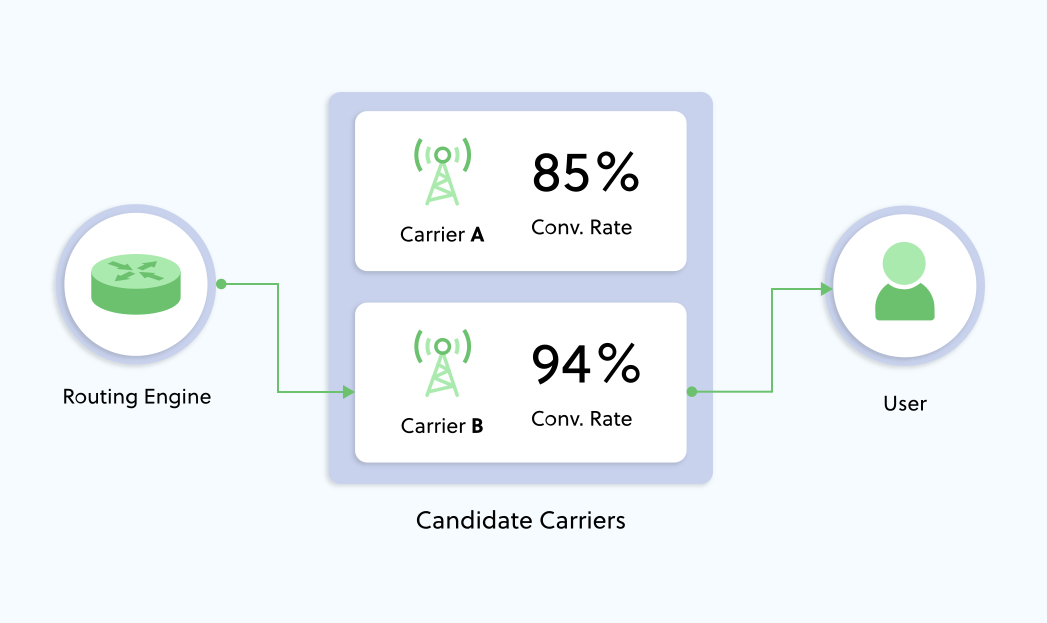 Your conversion feedback helps Plivo’s dynamic routing engine ensure that your messages are delivered over the best-performing carrier route at any given point in time.
Using the Conversion Feedback API involves marking messages as trackable and reporting successful conversions to Plivo.
## Marking messages as trackable
To get conversion feedback, set the *trackable* request parameter of the Send SMS API request to
`true` for your 2FA/OTP SMS messages. Setting *trackable* to
`true` implies that you intend to report conversion feedback for the message.
```sh theme={null}
curl -i --user AUTH_ID:AUTH_TOKEN \
-H "Content-Type: application/json" \
-d '{"src": "14155551111","dst": "14155552222", "text": "Hi, text from Plivo", “trackable”: true}' \
https://api.plivo.com/v1/Account/{auth_id}/Message/
```
In your authentication system, map the Plivo *message\_uuid* returned for the message to the verification request by your end user.
## Reporting successful conversions to Plivo
When an end user successfully authenticates using the verification code sent to them via Plivo, make a POST request to this API endpoint to report the conversion to Plivo:
```txt POST theme={null}
https://api.plivo.com/v1/account/{auth_id}/message/{message_uuid}/conversion
```
### Required headers
The API only accepts input of the type `application/json`. All POST requests must be passed as JSON with the `Content-Type` header set to `application/json`.
### Request parameters
* `status` mandatory, string
The status of the conversion, which can be one of
`CONVERTED`,
`NOT_CONVERTED`, or
`CONVERTED_WITH_OTHERS`. Trackable messages for which a conversion API request is not received are considered
`NOT_CONVERTED` by default.
* `timestamp` mandatory, string
The timestamp of when the status changed, which will usually be different from the timestamp at which the message was sent. The timestamp must be in [RFC 8601](https://www.w3.org/TR/NOTE-datetime) format; for example, 2020-08-01T11:32:26Z.
## Example request
```sh theme={null}
curl -X POST \
https://api.plivo.com/v1/account/{auth_id}/message/{message_uuid}/conversion/ \
-H 'authorization: Basic ' \
-H 'content-type: application/json' \
-d '{
"timestamp" : "2023-02-09T09:00:43.511Z",
"status": "CONVERTED"
}
'
```
## Example response
```json theme={null}
{
"api_id": "",
"conversion_uuid": "conv-",
"message": "successfully recorded.",
"message_uuid": ""
}
```
Your conversion feedback helps Plivo’s dynamic routing engine ensure that your messages are delivered over the best-performing carrier route at any given point in time.
Using the Conversion Feedback API involves marking messages as trackable and reporting successful conversions to Plivo.
## Marking messages as trackable
To get conversion feedback, set the *trackable* request parameter of the Send SMS API request to
`true` for your 2FA/OTP SMS messages. Setting *trackable* to
`true` implies that you intend to report conversion feedback for the message.
```sh theme={null}
curl -i --user AUTH_ID:AUTH_TOKEN \
-H "Content-Type: application/json" \
-d '{"src": "14155551111","dst": "14155552222", "text": "Hi, text from Plivo", “trackable”: true}' \
https://api.plivo.com/v1/Account/{auth_id}/Message/
```
In your authentication system, map the Plivo *message\_uuid* returned for the message to the verification request by your end user.
## Reporting successful conversions to Plivo
When an end user successfully authenticates using the verification code sent to them via Plivo, make a POST request to this API endpoint to report the conversion to Plivo:
```txt POST theme={null}
https://api.plivo.com/v1/account/{auth_id}/message/{message_uuid}/conversion
```
### Required headers
The API only accepts input of the type `application/json`. All POST requests must be passed as JSON with the `Content-Type` header set to `application/json`.
### Request parameters
* `status` mandatory, string
The status of the conversion, which can be one of
`CONVERTED`,
`NOT_CONVERTED`, or
`CONVERTED_WITH_OTHERS`. Trackable messages for which a conversion API request is not received are considered
`NOT_CONVERTED` by default.
* `timestamp` mandatory, string
The timestamp of when the status changed, which will usually be different from the timestamp at which the message was sent. The timestamp must be in [RFC 8601](https://www.w3.org/TR/NOTE-datetime) format; for example, 2020-08-01T11:32:26Z.
## Example request
```sh theme={null}
curl -X POST \
https://api.plivo.com/v1/account/{auth_id}/message/{message_uuid}/conversion/ \
-H 'authorization: Basic ' \
-H 'content-type: application/json' \
-d '{
"timestamp" : "2023-02-09T09:00:43.511Z",
"status": "CONVERTED"
}
'
```
## Example response
```json theme={null}
{
"api_id": "",
"conversion_uuid": "conv-",
"message": "successfully recorded.",
"message_uuid": ""
}
```