> ## Documentation Index
> Fetch the complete documentation index at: https://plivo.com/docs/llms.txt
> Use this file to discover all available pages before exploring further.
# Set up your workflow
> Create a GitHub Actions workflow to send Plivo SMS on events
In GitHub Actions, a [workflow](https://docs.github.com/en/actions/reference/workflow-syntax-for-github-actions) is a configurable automated process made up of one or more jobs. A YAML file defines your workflow configuration.
You can use the GitHub web UI to add a workflow to your repository, or you can configure your workflow by modifying files locally. Here’s how each of those processes look.
## GitHub UI
* Go to the repository where you want to set up a workflow.
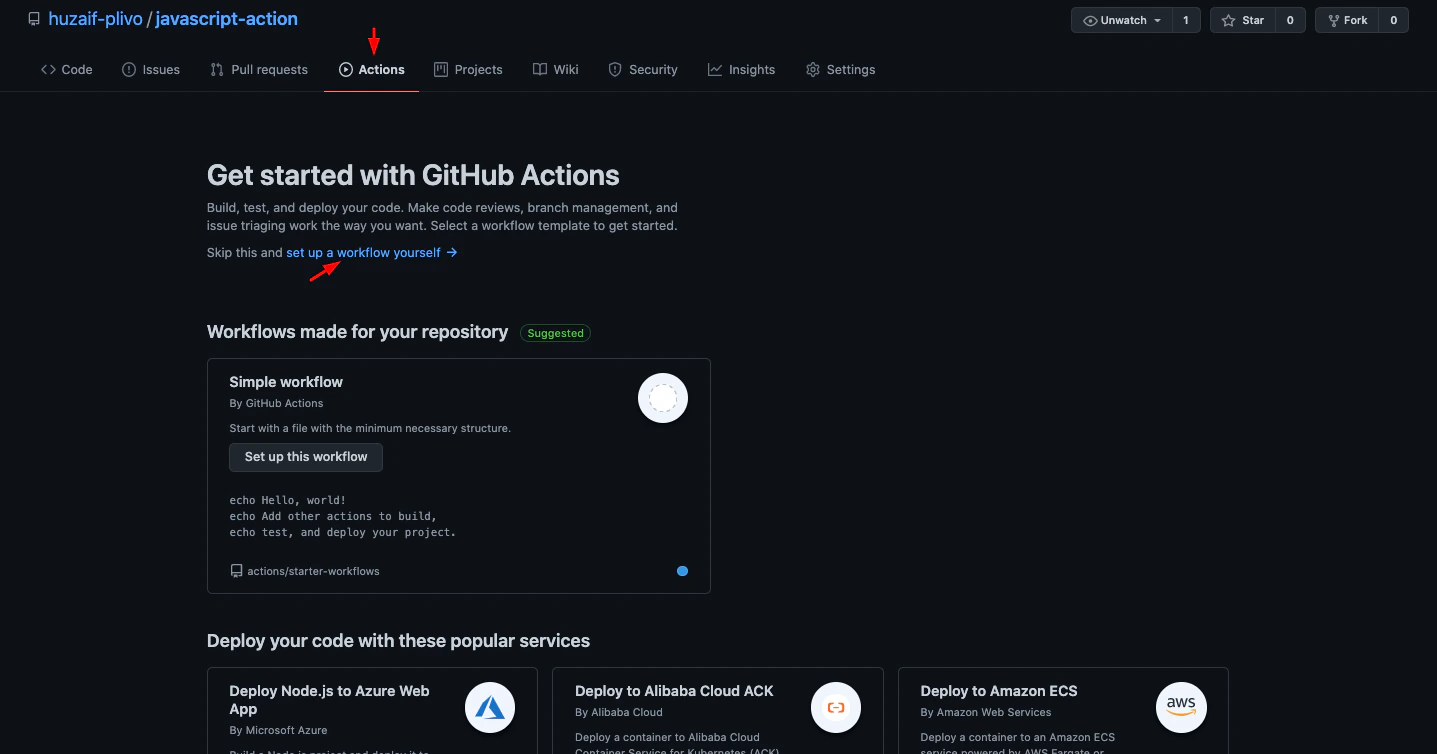
* Click on **Actions**, then select set up a **workflow**.
 * Under Marketplace, search for Plivo SMS, then click on it.
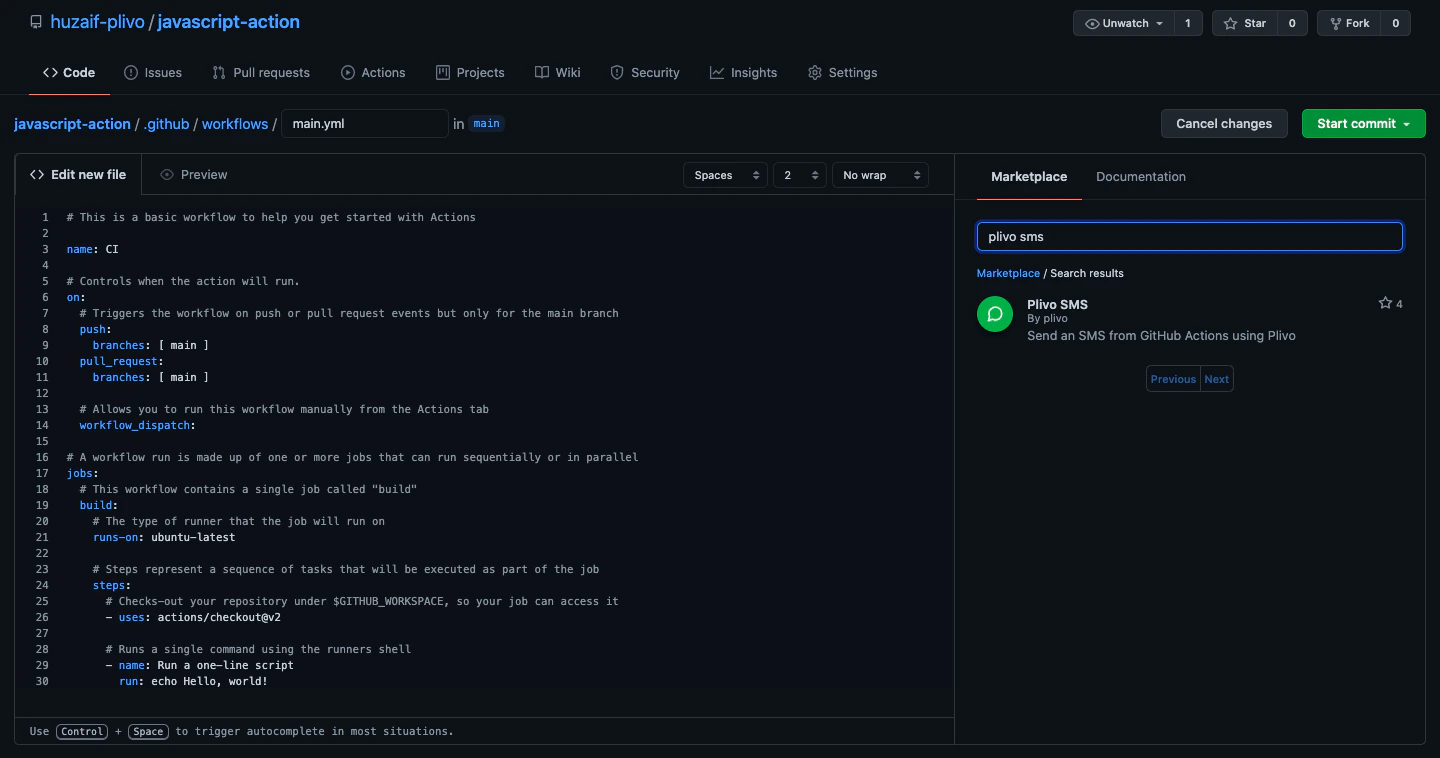 * Copy the code snippet from the Installation pane and paste it into your **main.yml** file.
* You can paste the code snippet within the **steps** interface.
```yml theme={null}
steps:
- name: 'Sending SMS Notification'
uses: plivo/actions-sms@v1
with:
fromPhoneNumber: ${{secrets.FROM_NUMBER}}
toPhoneNumber: ${{secrets.TO_NUMBER}}
message: '💡There has been new release to ${{github.repository}}'
env:
PLIVO_AUTH_ID: ${{secrets.PLIVO_AUTH_ID}}
PLIVO_AUTH_TOKEN: ${{secrets.PLIVO_AUTH_TOKEN}}
```
* Click on the **Start commit** button to commit the changes in your branch.
## Locally
* Go to your local repository and create a new directory named\*\* .github/workflows\*\*, then create a new file name **main.yml**.
* Paste this code within the **steps** interface.
```yml theme={null}
steps:
- name: 'Sending SMS Notification'
uses: plivo/actions-sms@v1
with:
fromPhoneNumber: ${{secrets.FROM_NUMBER}}
toPhoneNumber: ${{ secrets.TO_NUMBER}}
message: '💡There has been new release to ${{github.repository}}'
env:
PLIVO_AUTH_ID: ${{ secrets.PLIVO_AUTH_ID}}
PLIVO_AUTH_TOKEN: ${{ secrets.PLIVO_AUTH_TOKEN}}
```
* Commit the changes to your repository.
* Copy the code snippet from the Installation pane and paste it into your **main.yml** file.
* You can paste the code snippet within the **steps** interface.
```yml theme={null}
steps:
- name: 'Sending SMS Notification'
uses: plivo/actions-sms@v1
with:
fromPhoneNumber: ${{secrets.FROM_NUMBER}}
toPhoneNumber: ${{secrets.TO_NUMBER}}
message: '💡There has been new release to ${{github.repository}}'
env:
PLIVO_AUTH_ID: ${{secrets.PLIVO_AUTH_ID}}
PLIVO_AUTH_TOKEN: ${{secrets.PLIVO_AUTH_TOKEN}}
```
* Click on the **Start commit** button to commit the changes in your branch.
## Locally
* Go to your local repository and create a new directory named\*\* .github/workflows\*\*, then create a new file name **main.yml**.
* Paste this code within the **steps** interface.
```yml theme={null}
steps:
- name: 'Sending SMS Notification'
uses: plivo/actions-sms@v1
with:
fromPhoneNumber: ${{secrets.FROM_NUMBER}}
toPhoneNumber: ${{ secrets.TO_NUMBER}}
message: '💡There has been new release to ${{github.repository}}'
env:
PLIVO_AUTH_ID: ${{ secrets.PLIVO_AUTH_ID}}
PLIVO_AUTH_TOKEN: ${{ secrets.PLIVO_AUTH_TOKEN}}
```
* Commit the changes to your repository.