> ## Documentation Index
> Fetch the complete documentation index at: https://plivo.com/docs/llms.txt
> Use this file to discover all available pages before exploring further.
# Tasks
> Track follow-ups, escalations, and actions tied to conversations
**Tasks** are used to track actions that need to be completed. These actions can be follow-ups, internal reviews, escalations, or other operational activities. Tasks ensure that no necessary actions are overlooked and help maintain organization within the workflow.
Tasks are created based on interactions with customers, and they can be generated either manually by agents or automatically through AI agent flows. Once a task is created, it can be tracked, managed, and updated based on its priority and due date.
## Key Properties of a Task
 ### **Channel**
The **Channel** property defines the communication medium associated with the task. This helps categorize tasks based on the type of interaction that triggered them.
* **Call**: A task related to a phone call interaction.
* **Message**: A task triggered by a message-based interaction.
* **WhatsApp**: A task based on a WhatsApp communication.
### **Task Type**
The **Task Type** defines the nature or category of the task, helping to organize and prioritize tasks based on their purpose.
* **Follow-up**: Tasks that require a follow-up action, such as a call or check-in with a customer.
* **Internal**: Tasks created for internal use, such as documentation or reviewing customer details.
### **Priority**
The **Priority** field helps categorize the urgency of the task, allowing agents to prioritize and tackle the most critical tasks first.
* **Low**: Tasks that can be handled later.
* **Medium**: Tasks that should be completed as part of the normal workflow.
* **High**: Urgent tasks that need to be addressed soon.
* **Critical**: Extremely urgent tasks requiring immediate attention.
### **Assignee**
The **Assignee** is the agent or team responsible for completing the task. This ensures that every task has a clear owner and can be tracked effectively.
* **Individual Agent**: A specific agent is assigned the task.
* **Team**: The task is assigned to a team, and any available member can complete it.
### **Due Date**
The **Due Date** specifies when the task needs to be completed. This ensures tasks are finished within an appropriate time frame, which is crucial for follow-ups or high-priority tasks.
## How Tasks Are Associated with Conversations
Tasks are created and **associated with specific conversations** to ensure that follow-up actions are tracked in relation to the initial customer interaction. For example, if a customer asks for a follow-up call, a task will be created in the workflow, linked to the original conversation, to ensure timely follow-up.
## Task Creation
### **Create Task Manually**
### **Channel**
The **Channel** property defines the communication medium associated with the task. This helps categorize tasks based on the type of interaction that triggered them.
* **Call**: A task related to a phone call interaction.
* **Message**: A task triggered by a message-based interaction.
* **WhatsApp**: A task based on a WhatsApp communication.
### **Task Type**
The **Task Type** defines the nature or category of the task, helping to organize and prioritize tasks based on their purpose.
* **Follow-up**: Tasks that require a follow-up action, such as a call or check-in with a customer.
* **Internal**: Tasks created for internal use, such as documentation or reviewing customer details.
### **Priority**
The **Priority** field helps categorize the urgency of the task, allowing agents to prioritize and tackle the most critical tasks first.
* **Low**: Tasks that can be handled later.
* **Medium**: Tasks that should be completed as part of the normal workflow.
* **High**: Urgent tasks that need to be addressed soon.
* **Critical**: Extremely urgent tasks requiring immediate attention.
### **Assignee**
The **Assignee** is the agent or team responsible for completing the task. This ensures that every task has a clear owner and can be tracked effectively.
* **Individual Agent**: A specific agent is assigned the task.
* **Team**: The task is assigned to a team, and any available member can complete it.
### **Due Date**
The **Due Date** specifies when the task needs to be completed. This ensures tasks are finished within an appropriate time frame, which is crucial for follow-ups or high-priority tasks.
## How Tasks Are Associated with Conversations
Tasks are created and **associated with specific conversations** to ensure that follow-up actions are tracked in relation to the initial customer interaction. For example, if a customer asks for a follow-up call, a task will be created in the workflow, linked to the original conversation, to ensure timely follow-up.
## Task Creation
### **Create Task Manually**
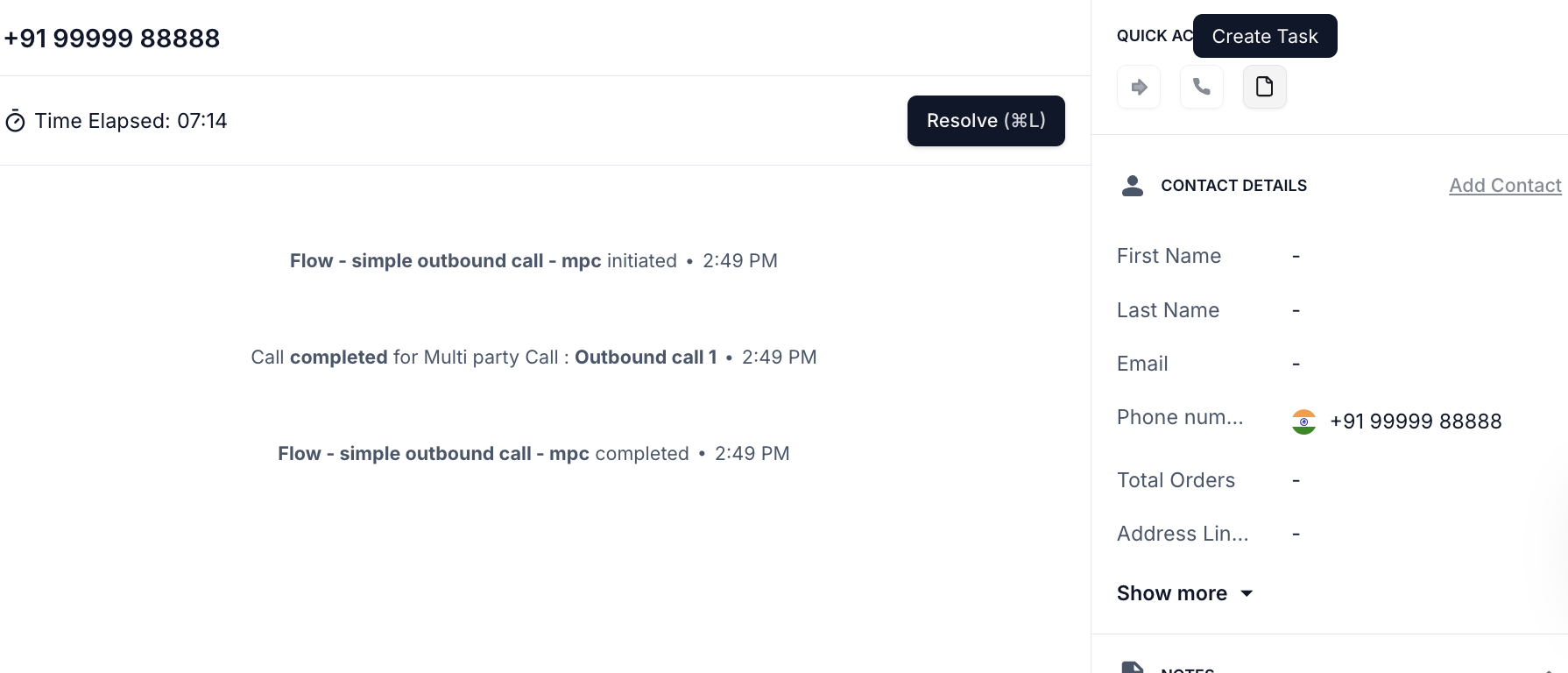 * Tasks can be created by agents when they identify a need for follow-up or action for an active conversation
* Steps:
1. Go to **Conversation** and open an active Conversation
2. On the Tool Bar on the right side of the screen, there will be a **Quick Actions** tool bar.
3. There is an option to create a task associated with that conversation.
### **Task Creation via AI Agent Flow**
* Tasks can be created by agents when they identify a need for follow-up or action for an active conversation
* Steps:
1. Go to **Conversation** and open an active Conversation
2. On the Tool Bar on the right side of the screen, there will be a **Quick Actions** tool bar.
3. There is an option to create a task associated with that conversation.
### **Task Creation via AI Agent Flow**
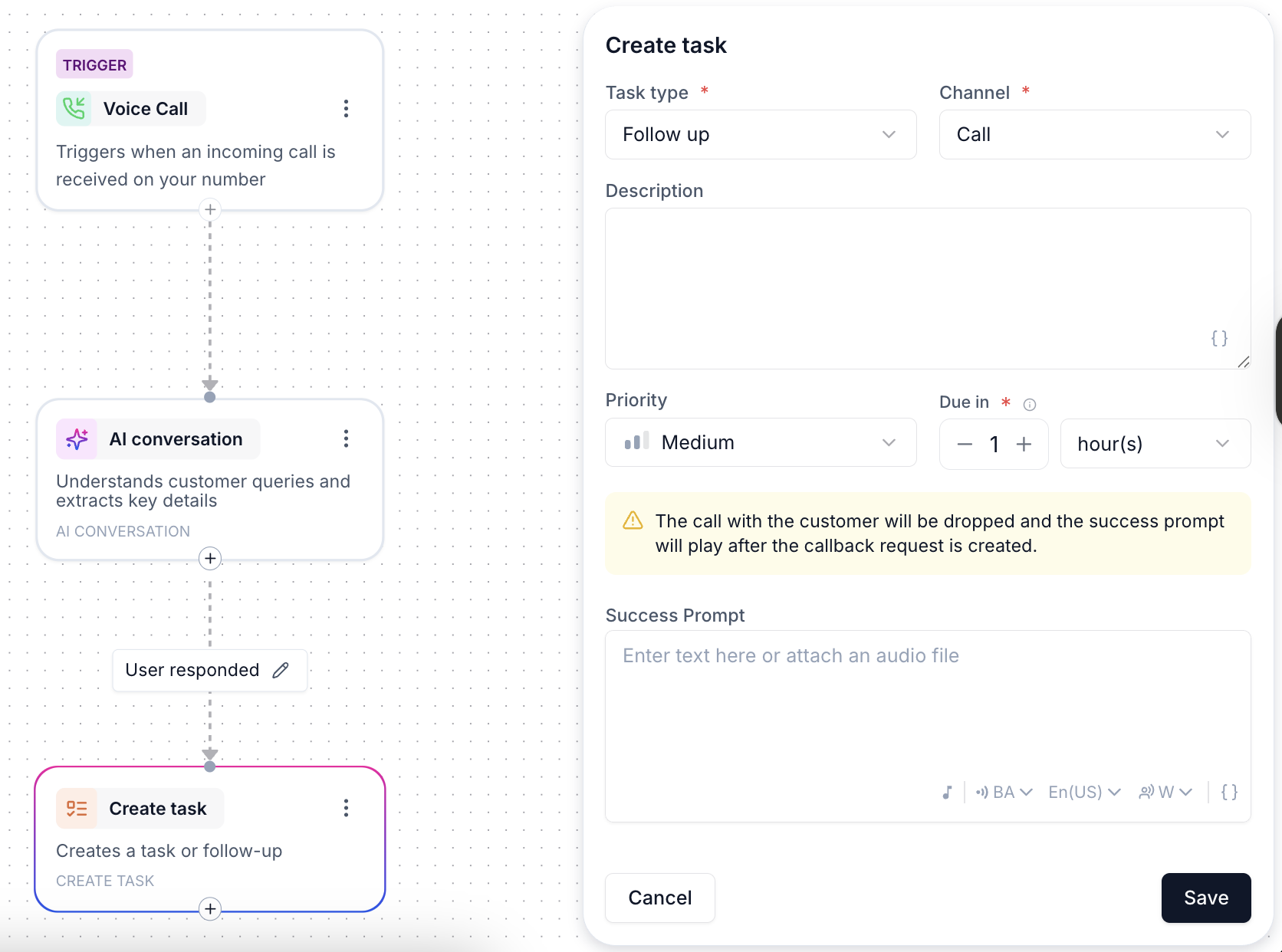 * Tasks can be automatically triggered in the agent flow based on conversation outcomes.
* The **Create Task node** in the flow allows automatic task creation, where fields like **Priority**, **Assignee**, and **Due Date** are dynamically populated.
## Task Activity Tracking
Each task is tracked with an **Activity Log**, recording every action performed on the task. This log provides insight into the task's lifecycle, from creation to resolution.
### Key Activities Tracked:
* **Task Creation**: Tracks who created the task and when.
* **Status Changes**: Captures any updates made to the task's status (e.g., from *To Do* to *In Progress* or *Resolved*).
* **Assignment Changes**: Records when the task is reassigned to another agent or team.
* **Completion**: Marks when the task is resolved or completed.
This activity log ensures accountability and provides a transparent history of task management.
* Tasks can be automatically triggered in the agent flow based on conversation outcomes.
* The **Create Task node** in the flow allows automatic task creation, where fields like **Priority**, **Assignee**, and **Due Date** are dynamically populated.
## Task Activity Tracking
Each task is tracked with an **Activity Log**, recording every action performed on the task. This log provides insight into the task's lifecycle, from creation to resolution.
### Key Activities Tracked:
* **Task Creation**: Tracks who created the task and when.
* **Status Changes**: Captures any updates made to the task's status (e.g., from *To Do* to *In Progress* or *Resolved*).
* **Assignment Changes**: Records when the task is reassigned to another agent or team.
* **Completion**: Marks when the task is resolved or completed.
This activity log ensures accountability and provides a transparent history of task management.