> ## Documentation Index
> Fetch the complete documentation index at: https://plivo.com/docs/llms.txt
> Use this file to discover all available pages before exploring further.
# Skills
> The Skills Node lets you process media or text to analyze, transform, or generate insights.
The **Skills Node** applies AI to analyze and generate insights from text, audio, image, or video inputs. This node enhances your agent’s capabilities by allowing it to interact with different media types—generating or analyzing content, transcribing audio, and more. Each skill type can integrate **agent variables** to make the experience more dynamic and adaptable.
### Skill Types
Currently, the **Skills Node** supports four skill types, each with its own configuration options. Each of these skills can make use of **agent variables** to personalize and customize the input data.
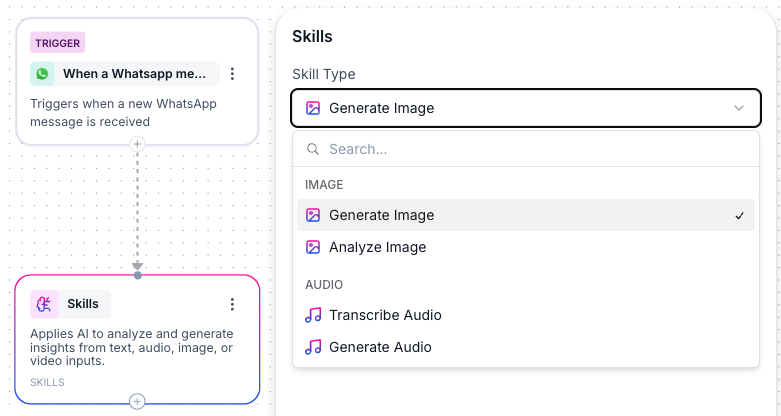 #### 1. **Image Generation**
* **Purpose**: Generate images based on provided instructions, useful for creating visual assets such as banners, designs, and illustrations.
* **Settings**:
* **Model Provider**: Choose the AI model provider for image generation.
* **Instructions**: Provide a description of the image you want to generate (e.g., "Generate a product banner with vibrant colors and promotional messaging").\
**Note**: You can include **agent variables** within the instructions to dynamically adjust the image creation based on user data or previous interactions (e.g., `{{product_name}}`, `{{color}}`).
* **Example**: Generate custom banners for promotions where the product and color can be dynamically pulled from the conversation context.
#### 2. **Image Analysis**
* **Purpose**: Analyze images to extract insights, detect objects, or classify content (e.g., quality checks, object detection).
* **Settings**:
* **Model Provider**: Choose the AI model provider for image analysis.
* **Image URL**: Provide the URL of the image to be analyzed. **Note**: You can insert **agent variables** here to dynamically supply the image URL, such as `{{user_uploaded_image_url}}`.
* **Instructions**: Define the analysis task, such as detecting specific objects, checking for damage, or identifying details. **Note**: You can include **agent variables** here as well to adapt the instructions to the current conversation (e.g., "Check for packaging damage in the image, and verify if the labels contain the product name `{{product_name}}`").
* **Example**: Analyze images for quality control or product verification using dynamically provided image URLs and instructions.
#### 3. **Transcribe Recording**
* **Purpose**: Convert audio recordings into text, useful for transcribing voice messages, meetings, or customer service calls.
* **Settings**:
* **Language**: Choose the language spoken in the recording (e.g., English, Spanish).
* **Model**: Select the model for audio transcription.
* **Audio URL**: Provide the URL of the audio file to be transcribed. **Note**: The **Audio URL** can contain **agent variables** to dynamically link to recordings (e.g., `{{audio_recording_url}}`).
* **Example**: Use this skill to transcribe customer service calls where the recording URL is dynamically passed from a previous node.
#### 4. **Generate Audio**
* **Purpose**: Convert text into speech, useful for generating voice-based interactions or notifications.
* **Settings**:
* **Model**: Select the AI model for audio generation.
* **Voice**: Choose the voice for the generated audio (e.g., male or female voice, specific accent).
* **Text**: Provide the text to be converted into speech. **Note**: You can include **agent variables** in the text to make the speech more dynamic and personalized (e.g., "Welcome back, customer\_name!").
* **Additional Instructions**: Specify any additional instructions for the tone, pace, or emphasis of the speech. **Note**: This field can also contain **agent variables** to adjust the instructions based on user input or previous interactions (e.g., "Create a personalized greeting for a new customer in a warm, conversational tone.").
* **Example**: Generate dynamic audio responses for customer greetings where both the text and tone can be adjusted based on the customer’s name or interaction history.
### Best Practices
* **Utilize Agent Variables**: Leverage agent variables within your instructions and input fields to personalize and dynamically adapt the AI’s behavior based on real-time data.
* **Clear and Concise Instructions**: The more specific and detailed your instructions, the better the AI will perform. Avoid vague descriptions and include necessary context.
* **Model Selection**: Test different models for performance (speed, accuracy) depending on the task (e.g., transcription accuracy, image generation style).
#### 1. **Image Generation**
* **Purpose**: Generate images based on provided instructions, useful for creating visual assets such as banners, designs, and illustrations.
* **Settings**:
* **Model Provider**: Choose the AI model provider for image generation.
* **Instructions**: Provide a description of the image you want to generate (e.g., "Generate a product banner with vibrant colors and promotional messaging").\
**Note**: You can include **agent variables** within the instructions to dynamically adjust the image creation based on user data or previous interactions (e.g., `{{product_name}}`, `{{color}}`).
* **Example**: Generate custom banners for promotions where the product and color can be dynamically pulled from the conversation context.
#### 2. **Image Analysis**
* **Purpose**: Analyze images to extract insights, detect objects, or classify content (e.g., quality checks, object detection).
* **Settings**:
* **Model Provider**: Choose the AI model provider for image analysis.
* **Image URL**: Provide the URL of the image to be analyzed. **Note**: You can insert **agent variables** here to dynamically supply the image URL, such as `{{user_uploaded_image_url}}`.
* **Instructions**: Define the analysis task, such as detecting specific objects, checking for damage, or identifying details. **Note**: You can include **agent variables** here as well to adapt the instructions to the current conversation (e.g., "Check for packaging damage in the image, and verify if the labels contain the product name `{{product_name}}`").
* **Example**: Analyze images for quality control or product verification using dynamically provided image URLs and instructions.
#### 3. **Transcribe Recording**
* **Purpose**: Convert audio recordings into text, useful for transcribing voice messages, meetings, or customer service calls.
* **Settings**:
* **Language**: Choose the language spoken in the recording (e.g., English, Spanish).
* **Model**: Select the model for audio transcription.
* **Audio URL**: Provide the URL of the audio file to be transcribed. **Note**: The **Audio URL** can contain **agent variables** to dynamically link to recordings (e.g., `{{audio_recording_url}}`).
* **Example**: Use this skill to transcribe customer service calls where the recording URL is dynamically passed from a previous node.
#### 4. **Generate Audio**
* **Purpose**: Convert text into speech, useful for generating voice-based interactions or notifications.
* **Settings**:
* **Model**: Select the AI model for audio generation.
* **Voice**: Choose the voice for the generated audio (e.g., male or female voice, specific accent).
* **Text**: Provide the text to be converted into speech. **Note**: You can include **agent variables** in the text to make the speech more dynamic and personalized (e.g., "Welcome back, customer\_name!").
* **Additional Instructions**: Specify any additional instructions for the tone, pace, or emphasis of the speech. **Note**: This field can also contain **agent variables** to adjust the instructions based on user input or previous interactions (e.g., "Create a personalized greeting for a new customer in a warm, conversational tone.").
* **Example**: Generate dynamic audio responses for customer greetings where both the text and tone can be adjusted based on the customer’s name or interaction history.
### Best Practices
* **Utilize Agent Variables**: Leverage agent variables within your instructions and input fields to personalize and dynamically adapt the AI’s behavior based on real-time data.
* **Clear and Concise Instructions**: The more specific and detailed your instructions, the better the AI will perform. Avoid vague descriptions and include necessary context.
* **Model Selection**: Test different models for performance (speed, accuracy) depending on the task (e.g., transcription accuracy, image generation style).